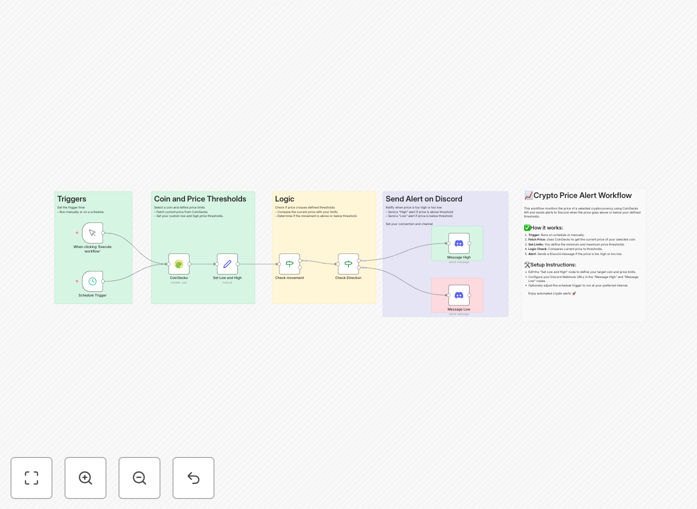
What This Workflow Does
This automation solves a critical problem for cryptocurrency traders and investors: missing key price movements because you can't watch the markets 24/7. Manually checking prices is inefficient, stressful, and often leads to missed opportunities or unexpected losses.
The workflow automatically monitors real-time cryptocurrency prices via the CoinGecko API, compares them against your predefined high and low thresholds, and sends instant alerts to your Discord channel when those thresholds are crossed. It transforms passive monitoring into proactive notification, ensuring you're always informed without constant screen time.
Whether you're waiting for Bitcoin to drop to a buying target, Ethereum to hit a profit-taking level, or monitoring a new altcoin's volatility, this system acts as your personal trading assistant—running silently in the background and speaking up only when it matters.
How It Works
The automation follows a clear, logical sequence that mimics how a trader would manually check and react to price changes—but with perfect consistency and instant execution.
Step 1: Trigger & Configuration
The workflow can be triggered manually for a one-time check or, more commonly, set on a schedule (every 5, 15, or 60 minutes). You configure the specific cryptocurrency (using its CoinGecko ID like "bitcoin" or "ethereum") and your desired high and low price thresholds in a "Set" node.
Step 2: Fetch Live Market Data
A CoinGecko node makes an API call to retrieve the current price of your chosen cryptocurrency. This data is reliable, real-time, and includes the current value in your preferred currency (USD, EUR, etc.).
Step 3: Decision Logic
An "IF" node performs the critical comparison. It checks if the current price is above your high threshold or below your low threshold. This logic gate determines which path the workflow follows next.
Step 4: Send Targeted Alert
Based on the logic check, the workflow sends a formatted message to your Discord channel via a webhook. The message clearly states which threshold was crossed, the current price, and the direction of movement. You can customize these messages to include emojis, timestamps, or additional context.
Pro tip: Set your schedule trigger to run frequently during volatile market periods (like major news events or high-volume trading hours) and less frequently during stable periods to optimize performance.
Who This Is For
This template is ideal for individual crypto investors, trading groups, DeFi participants, and financial analysts who need timely price information without constant manual checking.
Retail Investors: Perfect for those managing a personal portfolio who want to buy dips or take profits at specific levels without emotional decision-making.
Trading Communities & DAOs: Discord servers and trading groups can use this to alert all members simultaneously when key levels are hit, ensuring coordinated action.
Crypto Project Teams: Teams monitoring their token's price for treasury management, buyback programs, or community updates can automate reporting.
Financial Analysts & Researchers: Professionals tracking multiple assets for research or reporting can automate data collection and notification for significant movements.
What You'll Need
- A running n8n instance (cloud or self-hosted)
- A Discord server where you have permission to create webhooks
- The CoinGecko ID of your target cryptocurrency (e.g., "bitcoin", "ethereum", "solana")
- Your price thresholds – know what high and low prices you want to monitor
- Basic familiarity with n8n's interface (no coding required)
Quick Setup Guide
Follow these steps to implement this crypto alert system in under 10 minutes:
- Import the template: Download the JSON file above and import it into your n8n instance via the "Import from File" option.
- Configure the CoinGecko node: Open the CoinGecko node and ensure the correct coin ID is entered. Test the node to verify it fetches current prices.
- Set your price thresholds: In the "Set Low and High" node, define your specific price numbers for comparison. These are your alert triggers.
- Connect Discord webhooks: Create a webhook in your Discord channel settings and paste the URL into both Discord message nodes in the workflow.
- Customize alert messages: Edit the Discord message content to include your preferred formatting, mentions (@everyone, @role), or additional details.
- Set the schedule: Configure the Schedule Trigger node to run at your desired frequency (start with every 15 minutes for testing).
- Test and activate: Run the workflow once manually to verify everything works, then toggle it to "Active" to begin automated monitoring.
Pro tip: Create separate Discord channels for different alert types (e.g., #buy-alerts, #sell-alerts) and direct messages accordingly for better organization.
Key Benefits
Eliminate Emotional Trading: By automating price monitoring, you remove impulsive decisions triggered by price fluctuations. The system alerts you only when your predefined logic conditions are met, ensuring disciplined trading.
24/7 Market Coverage: The workflow runs continuously, monitoring prices even while you sleep, work, or are offline. You'll never miss a critical movement because you weren't watching the charts.
Multi-Asset Scalability: Easily duplicate the core logic to monitor dozens of cryptocurrencies simultaneously. A single n8n instance can track your entire portfolio with minimal additional configuration.
Instant Team Coordination: Discord alerts ensure your entire trading group or investment team receives notifications simultaneously, enabling coordinated decision-making without manual communication overhead.
Complete Customization: Beyond simple price thresholds, you can extend this template to calculate percentage changes, monitor trading volumes, track market cap movements, or integrate with trading APIs for automated execution.