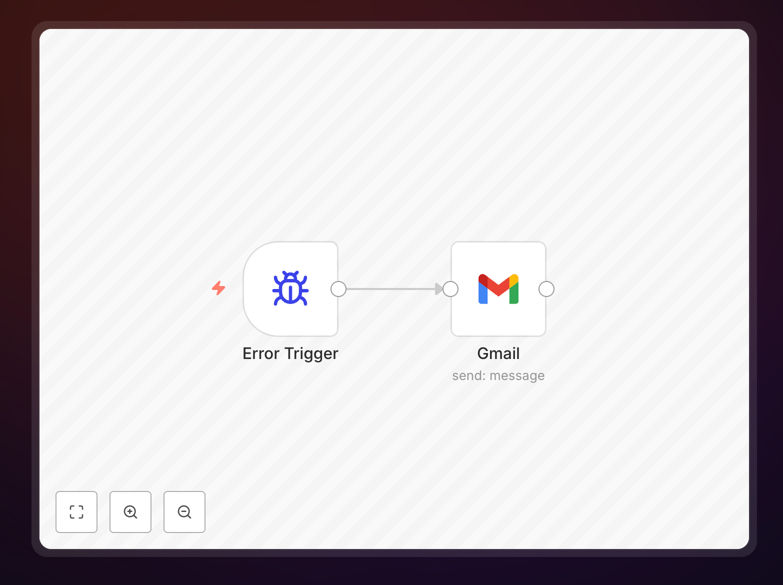
What This Workflow Does
When your business automation workflows fail silently, you might not discover the problem for hours or even days—leading to missed opportunities, data inconsistencies, and operational disruptions. This template solves that by automatically sending detailed email alerts via Gmail whenever an error occurs in your n8n workflows.
The system captures comprehensive error information including the workflow name, exact error message, the specific node that failed, execution URL for immediate investigation, and technical stack trace. This transforms invisible failures into actionable notifications that your team can address promptly, minimizing downtime and maintaining business continuity.
How It Works
The workflow uses n8n's built-in error handling capabilities combined with Gmail's reliable email delivery to create a robust monitoring system.
Step 1: Error Trigger Activation
When any configured workflow encounters an error, n8n automatically triggers this error workflow. The error trigger node captures all contextual information about the failure without requiring manual intervention.
Step 2: Data Enrichment and Formatting
The workflow extracts and structures the error details into a readable format. It identifies which workflow failed, what step caused the issue, when it occurred, and provides direct links to the problematic execution for quick troubleshooting.
Step 3: Gmail Notification Delivery
Using your configured Gmail credentials, the system sends a formatted email to designated recipients. The subject line clearly indicates which workflow failed, while the body contains all necessary technical and business context for resolution.
Who This Is For
This template is ideal for operations teams, DevOps engineers, business analysts, and automation managers who rely on n8n for critical business processes. It's particularly valuable for e-commerce businesses handling order processing, marketing teams running campaign automations, IT departments managing system integrations, and any organization where workflow reliability directly impacts revenue or customer experience.
Teams that manage multiple automations across departments will benefit most, as centralized error monitoring prevents issues from slipping through the cracks between different systems and team responsibilities.
What You'll Need
- An n8n instance (cloud or self-hosted) with workflows that need monitoring
- Gmail account credentials configured in n8n with sending permissions
- Recipient email addresses for team members who should receive alerts
- Basic n8n knowledge to import the template and configure connections
- Error workflows enabled in your n8n instance settings
Pro tip: Create different recipient groups for different severity levels—send critical errors to your on-call team, but route non-urgent warnings to a shared inbox for daily review.
Quick Setup Guide
- Download and import the JSON template into your n8n instance using the import workflow feature.
- Configure Gmail credentials by creating a new Gmail connection in n8n with appropriate sending permissions.
- Set recipient emails in the Gmail node by adding team email addresses that should receive alerts.
- Test the workflow by temporarily causing an error in another workflow to verify email delivery.
- Enable as error workflow in your n8n settings so it triggers automatically on failures.
Key Benefits
Reduce mean time to resolution (MTTR) by up to 80%. Instead of discovering failures during routine checks or customer complaints, your team gets notified immediately with all context needed for diagnosis.
Prevent revenue loss from silent failures. E-commerce order processing, payment reconciliations, and customer onboarding workflows can fail without obvious signs—until you notice declining metrics days later.
Create an audit trail of automation health. Every error email serves as documentation of system issues, helping identify patterns, recurring problems, and areas needing architectural improvement.
Enable proactive operations rather than reactive firefighting. Teams shift from constantly checking if automations are working to trusting the alert system will notify them when attention is needed.
Scale automation confidently across your organization. With reliable monitoring in place, you can deploy more workflows knowing failures won't go unnoticed and cause cascading problems.