Social Media AI Automation Content Creation BannerBear OpenAI

Automate Social Media Banner Creation with AI & BannerBear

Generate professional social media banners in minutes instead of hours using AI image generation and automated template design.

Download Template JSON · n8n compatible · Free
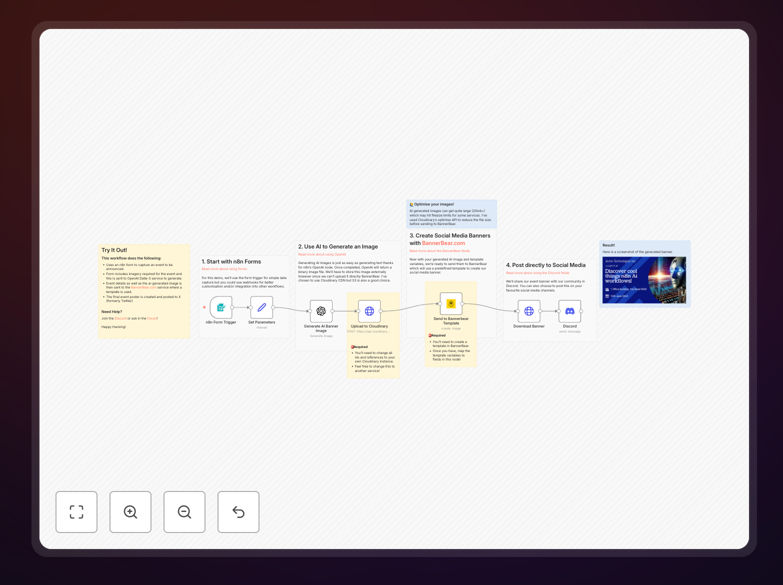
Social media banner automation workflow showing AI image generation and BannerBear integration

What This Workflow Does

Creating social media banners is a time-consuming task that often delays marketing campaigns. This automation solves that problem by combining AI image generation with BannerBear's template system to produce professional banners automatically.

The workflow starts with a simple form where users input event details and image preferences. It then uses OpenAI's DALL-E 3 to generate custom images based on those prompts, uploads them to BannerBear, and creates perfectly formatted banners for different social platforms. What used to take hours of designer time now happens in minutes without manual intervention.

How It Works

1. Form Trigger & Data Collection

The workflow begins with a form trigger where marketing teams or event organizers input banner requirements: event title, date, description, color preferences, and image style suggestions.

2. AI Image Generation

The system sends the image description to OpenAI's DALL-E 3 API, which generates a unique, high-quality image matching the requested style and theme. This eliminates the need for stock photos or custom photography.

3. BannerBear Template Processing

The generated image and form data are sent to BannerBear, where they populate a pre-designed template. BannerBear handles all the complex layout, text positioning, and platform-specific sizing automatically.

4. Output & Distribution

The final banners are generated in multiple sizes (Instagram, Facebook, Twitter, LinkedIn) and can be automatically saved to cloud storage, sent to team members for approval, or posted directly to social media scheduling tools.

Who This Is For

This automation is ideal for marketing teams, digital agencies, event companies, SaaS businesses, and content creators who regularly need social media graphics. It's particularly valuable for businesses running weekly promotions, product launches, webinars, or seasonal campaigns that require multiple banner variations across different platforms.

Small businesses without dedicated design resources benefit enormously, as do larger organizations looking to scale their content production while maintaining brand consistency. The workflow reduces dependency on graphic designers for routine banner creation.

What You'll Need

  1. BannerBear Account: You'll need a BannerBear.com account with at least one template set up for your banner designs.
  2. OpenAI API Key: Access to OpenAI's DALL-E 3 image generation service with an active API key.
  3. n8n Instance: A running n8n instance (cloud or self-hosted) to import and run the workflow.
  4. Basic Form Interface: A simple way to trigger the workflow - this could be an n8n form, webhook, or integration with your existing systems.

Pro tip: Start with 2-3 BannerBear templates for your most common banner types (event promotion, product launch, weekly special). Once the automation is working smoothly, expand to cover all your regular content needs.

Quick Setup Guide

  1. Download and Import: Download the template file and import it into your n8n instance using the workflow import feature.
  2. Configure Credentials: Set up credentials for OpenAI (DALL-E 3) and BannerBear in n8n's credentials management.
  3. Update Template IDs: Replace the placeholder BannerBear template ID with your actual template ID from your BannerBear account.
  4. Test with Sample Data: Run the workflow manually with test data to ensure all connections work correctly.
  5. Set Up Trigger: Configure your preferred trigger method - this could be an n8n form, schedule, or webhook from your marketing tools.
  6. Configure Output Destinations: Set where completed banners should go - Google Drive, Dropbox, or directly to your social media scheduling tool.

Key Benefits

Save 5-10 hours weekly on design work by automating routine banner creation. What used to require back-and-forth with designers or searching for stock images now happens automatically.

Maintain perfect brand consistency across all platforms. Every banner follows your exact template specifications, ensuring colors, fonts, and layouts match your brand guidelines perfectly.

Scale content production without adding staff by handling increased banner needs through automation rather than hiring additional designers.

Enable rapid campaign testing by generating multiple banner variations quickly to test different designs, messages, and images for optimal performance.

Reduce campaign launch time from days to minutes. When opportunities arise, you can create and deploy professional banners immediately rather than waiting for designer availability.

Frequently Asked Questions

Common questions about social media banner automation and integration

AI can generate images, write captions, and suggest designs based on simple prompts. For social media banners, AI image generators like DALL-E or Midjourney can create unique visuals in seconds, eliminating the need for stock photos or hiring designers for every campaign.

This transforms content creation from a bottleneck into a scalable process. Marketing teams can produce dozens of banner variations for A/B testing, create personalized graphics for different audience segments, and respond instantly to trending topics without design delays.

Automating social media asset creation saves 5-10 hours per week on design work, ensures brand consistency across platforms, enables rapid campaign testing, and allows marketers to focus on strategy rather than manual production tasks.

Beyond time savings, automation reduces errors from manual processes, creates predictable output quality, and makes it easy to maintain a consistent posting schedule. It also allows smaller teams to compete with larger organizations by matching their content production volume.

BannerBear uses templates with dynamic fields that can be populated automatically. When combined with AI image generation, you can create AI images, feed them into BannerBear templates, and generate polished social media banners without manual intervention.

The integration works through API calls where you send image URLs and text variables to BannerBear, which then renders them according to your template design. This separates the creative design work (done once in templates) from the production work (automated for each banner).

E-commerce stores, digital agencies, event organizers, SaaS companies, and content creators benefit most. Any business running regular promotions, events, or content campaigns that require multiple banner variations across different platforms and sizes.

Businesses with seasonal campaigns, frequent product launches, or ongoing content calendars see the greatest ROI. The automation pays for itself quickly by reducing designer hours and accelerating time-to-market for marketing initiatives.

Manual banner creation takes 30-60 minutes per design. Automation reduces this to 2-3 minutes. For a weekly campaign needing 5 banners across 3 platforms, that's 15 banners saving 7-14 hours weekly, or 30-60 hours monthly.

These savings compound over time. What starts as time savings becomes capacity expansion - the same team can now handle 3-4x more campaigns, test more variations, or reallocate saved hours to higher-value strategic work.

Common challenges include maintaining brand consistency, handling image sizing for different platforms, managing template variations, ensuring AI-generated images match brand guidelines, and creating a smooth approval workflow before publishing.

Successful automation addresses these through careful template design, clear brand guidelines for AI prompts, automated quality checks, and integration with existing approval processes. The key is starting simple and expanding as you refine each component.

  • Start with your most common banner type before expanding
  • Create clear prompt guidelines for consistent AI output
  • Build in quality check steps before final delivery

Yes, GrowwStacks specializes in building custom social media automation systems tailored to your specific brand guidelines, content calendar, and platform requirements. We can integrate your existing tools and create workflows that match your unique processes.

Our team works with you to understand your current pain points, design automation that fits your workflow, and implement solutions that scale with your business. We handle everything from initial consultation to implementation and ongoing support.

  • Custom templates matching your exact brand specifications
  • Integration with your existing marketing stack
  • Workflow design optimized for your team's processes
  • Ongoing support and optimization as your needs evolve

Need a Custom Social Media Automation?

This free template is a starting point. Our team builds fully tailored automation systems for your specific business needs.