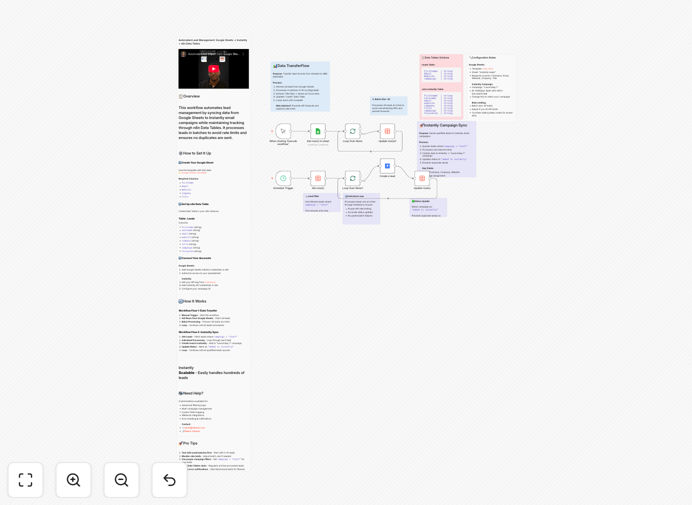
What This Workflow Does
Manual lead management is a silent revenue killer. Sales teams waste hours copying data from spreadsheets to email tools, often missing timely follow-ups or accidentally emailing the same person twice. This creates a poor prospect experience and leaks potential deals.
This automation solves that by creating a seamless bridge between your lead source (Google Sheets) and your outreach engine (Instantly.ai). Whenever you add a new lead to your sheet, the workflow automatically picks it up, enriches the data, adds it to a specific email campaign in Instantly, and marks it as processed—all without you lifting a finger. It intelligently processes leads in batches to avoid overloading APIs and uses n8n's Data Table as a tracking ledger to guarantee no lead is ever emailed twice.
How It Works
The workflow operates on two parallel, intelligent paths to ensure data integrity and timely delivery.
1. Data Transfer & Enrichment Path
This path is triggered manually when you have a new batch of leads. It fetches all records from your designated Google Sheet, splits them into manageable groups of 30 (to prevent timeouts), and inserts or updates each lead in a central n8n Data Table. During this transfer, it can transform data, such as pulling the job title into a dedicated "focus area" field for later personalization.
2. Automated Campaign Sync Path
This path runs on a schedule (e.g., every hour). It queries the Data Table for all leads marked with a status like "ready to sync." It then processes each lead individually, sending their details (email, name, company, website) to a specified campaign in your Instantly.ai account. Immediately after a successful send, it updates that lead's status in the Data Table to "added to campaign," creating an immutable record that prevents any future duplicate emails.
Pro tip: Use the manual trigger path for initial bulk imports and testing. Once verified, rely on the scheduled trigger for ongoing, hands-free automation of new leads as they arrive in your sheet.
Who This Is For
This template is ideal for sales teams, marketing agencies, founders, and solopreneurs who run outbound email campaigns and manage their lead lists in Google Sheets. If you're using tools like Instantly, Lemlist, or similar for cold email and are tired of the copy-paste routine, this automation will save you 5-10 hours per week. It's also perfect for businesses that collect leads through forms, landing pages, or events that export to Sheets and need immediate, automated follow-up.
What You'll Need
- A Google Sheet with lead data (columns for Email, First Name, Company, Website, etc.).
- An active Instantly.ai account with a campaign set up and your API key.
- A running n8n instance (cloud or self-hosted).
- Google OAuth credentials set up in n8n to access your sheet.
- The Instantly node installed in your n8n instance (community node).
Quick Setup Guide
Follow these steps to get your automation live in under 15 minutes.
- Import the Template: Download the JSON file using the button above and import it into your n8n workspace.
- Connect Google Sheets: In the "Get row(s) in sheet" node, create a new OAuth credential and select your spreadsheet and worksheet.
- Connect Instantly.ai: In the "Create a lead" node, add your Instantly API key and update the Campaign ID to match your actual Instantly campaign.
- Set Up the Data Table: Create a new Data Table named "Leads" with the columns: Firstname, Email, Company, Website, Campaign (for status). The workflow nodes are pre-configured to use this name.
- Test: Add a test lead to your sheet, manually trigger the first path to transfer it to the Data Table, then run the schedule trigger to see it appear in your Instantly dashboard.
Key Benefits
Eliminate Human Error & Duplicates: The automated tracking system ensures every lead is processed exactly once, removing the risk of manual copy-paste mistakes or sending repetitive emails that damage sender reputation.
Achieve Instant Follow-up: Leads can be added to an email sequence within minutes of being recorded in your sheet, dramatically increasing engagement rates compared to manual, delayed outreach.
Scale Your Outreach Effortlessly: Process hundreds or thousands of leads as easily as ten. The batch logic handles large lists reliably without requiring additional effort from your team.
Gain Clear Visibility & Control: The n8n Data Table acts as a single source of truth, showing you the exact status of every lead (pending, synced, failed) and giving you full auditability over your outreach process.
Reclaim Strategic Time: Automating this repetitive task frees up several hours each week for your sales and marketing team to focus on high-value activities like closing deals and crafting strategy.