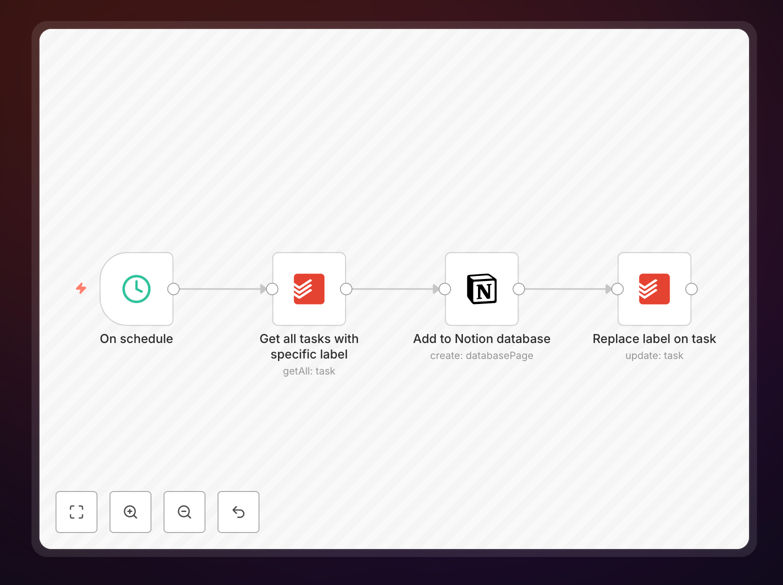
What This Workflow Does
This automation solves a common productivity gap: capturing quick tasks in Todoist while maintaining organized project documentation in Notion. Manually transferring tasks between these platforms is time-consuming and error-prone, leading to missed updates and inconsistent records.
The workflow automatically monitors your Todoist for tasks with a specific label (like "send-to-n8n" or "notion-worthy") and creates corresponding database entries in your Notion workspace. This ensures that important action items don't get lost in daily task management but instead become part of your permanent project documentation.
By connecting these two powerful tools, you create a seamless workflow where execution (Todoist) meets documentation (Notion) without any manual intervention. This is particularly valuable for teams managing client projects, product development, or content calendars where task completion needs to be tracked alongside project documentation.
How It Works
The automation follows a simple but powerful sequence that runs automatically in the background:
1. Task Monitoring in Todoist
The workflow continuously checks your Todoist account for new or updated tasks. It specifically looks for tasks that have been tagged with your designated trigger label. This label-based approach gives you complete control—only tasks you explicitly mark for documentation get transferred.
2. Label Detection & Filtering
When a task with the trigger label is detected, the workflow extracts all relevant information: task name, description, due date, priority level, project context, and any additional labels or comments. This ensures the full context of the task is preserved during the transfer.
3. Data Transformation for Notion
The workflow reformats the Todoist task data into the structure required by your Notion database. This includes mapping Todoist properties (like priority levels) to corresponding Notion property types (like select or status fields), ensuring the information appears correctly in your Notion workspace.
4. Database Entry Creation
The transformed data is then used to create a new page in your specified Notion database. The workflow handles all the API connections and authentication, creating a rich database entry that includes all the task details, ready for further organization or collaboration within Notion.
5. Confirmation & Error Handling
After successful creation, the workflow can optionally update the Todoist task with a confirmation note or trigger additional actions. If anything goes wrong (like connection issues), the workflow includes error handling to retry or notify you, ensuring no task gets lost in the process.
Who This Is For
This automation is ideal for professionals and teams who use Todoist for daily task management but need structured documentation in Notion. Project managers can ensure completed tasks automatically update project timelines. Content creators can transfer article ideas from Todoist to their editorial calendar in Notion. Consultants can move client deliverables from their personal task list to client-facing documentation.
Freelancers juggling multiple clients benefit by keeping client work synchronized between execution (Todoist) and billing/documentation (Notion). Product teams can ensure bug reports and feature requests captured in Todoist automatically populate their product roadmap in Notion. The workflow is particularly valuable for anyone who needs to maintain audit trails or demonstrate work completion without manual reporting.
What You'll Need
- A Todoist account (Free or paid tier)
- A Notion account with a database ready to receive tasks
- n8n instance (cloud or self-hosted)
- API credentials for both Todoist and Notion
- A specific label in Todoist to trigger the automation (e.g., "notion-sync")
Pro tip: Create a dedicated "Notion Sync" project in Todoist to test the workflow before applying it to your main projects. This lets you verify everything works correctly without affecting your active tasks.
Quick Setup Guide
Follow these steps to implement this automation in under 10 minutes:
- Download the template using the button above and import it into your n8n instance.
- Connect your Todoist account in n8n using OAuth or API token authentication.
- Connect your Notion account and select the database where tasks should be created.
- Configure the trigger label in the Todoist node to match your preferred label name.
- Map the property fields between Todoist and Notion to ensure data transfers correctly.
- Test the workflow by creating a task in Todoist with your trigger label and verifying it appears in Notion.
- Activate the workflow and let it run automatically in the background.
Key Benefits
Eliminate manual data entry: Save 1-2 hours per week that would otherwise be spent copying tasks between applications. This time adds up to 50-100 hours annually per team member.
Maintain perfect synchronization: Ensure your task management and project documentation are always aligned. No more forgotten tasks or outdated project statuses in Notion.
Create automatic audit trails: Every completed task leaves a timestamped record in Notion, perfect for client reporting, compliance, or retrospective analysis.
Scale your productivity system: As your team grows, this automation ensures everyone's work is documented consistently without additional training or manual processes.
Flexible and customizable: Easily modify the workflow to include additional data, trigger different actions, or connect to other tools in your stack.