Telegram OpenAI Supabase AI Chatbot n8n

Telegram Bot with Supabase Memory & OpenAI Assistant

Build a context-aware AI chatbot that remembers conversations and provides personalized responses using Telegram, OpenAI Assistant, and Supabase database.

Download Template JSON · n8n compatible · Free
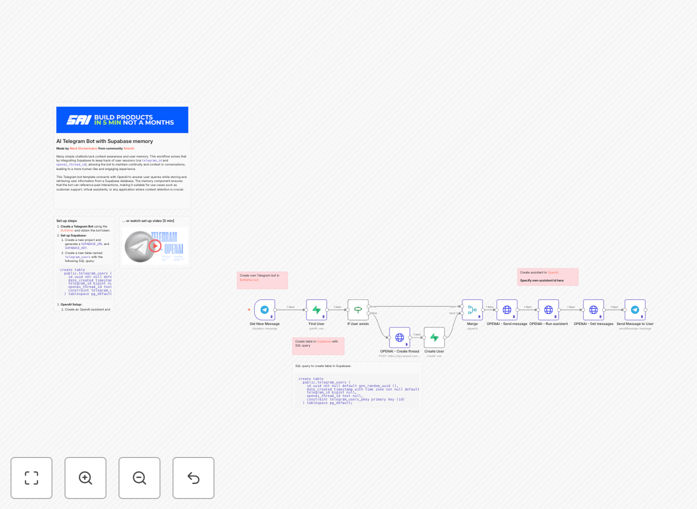
Telegram AI chatbot workflow diagram showing integration between Telegram, OpenAI Assistant, and Supabase database

What This Workflow Does

This automation solves a critical limitation of most chatbots: lack of memory. Basic chatbots treat every message as a new conversation, forcing users to repeat context and preferences. This workflow creates an intelligent Telegram bot that remembers past interactions, user details, and conversation history using Supabase as a memory layer and OpenAI Assistant for intelligent responses.

The bot maintains continuity across sessions by storing each user's Telegram ID alongside their unique OpenAI thread ID in Supabase. When a user messages, the workflow checks if they exist in the database, retrieves their conversation thread, and continues the dialogue with full context. This creates a personalized experience ideal for customer support, virtual assistants, educational tools, or any application where context retention improves user satisfaction.

How It Works

1. Message Reception & User Identification

The Telegram trigger node listens for new messages. When a user sends a message, the workflow extracts their Telegram ID and checks the Supabase database for an existing record.

2. Database Lookup & User Creation

If the user exists in Supabase, their OpenAI thread ID is retrieved. If not, a new record is created with their Telegram ID and a fresh OpenAI thread ID is generated. This ensures every user has persistent storage for their conversation history.

3. Context Preparation & Message Processing

The user's message is combined with their conversation context from the database. The workflow merges this data and prepares it for the OpenAI Assistant, maintaining the thread's memory of previous exchanges.

4. AI Response Generation

The OpenAI Assistant node processes the message within the existing thread context, generating a response that considers the entire conversation history. The Assistant can be customized with specific instructions, knowledge files, or tool capabilities.

5. Response Delivery & Database Update

The AI's response is sent back to the user via Telegram. The conversation thread in OpenAI is automatically updated, and any necessary metadata is stored in Supabase for future interactions.

Pro tip: Customize your OpenAI Assistant with specific instructions about tone, knowledge domains, and response format. You can upload company documents to create a specialized knowledge base that the bot can reference during conversations.

Who This Is For

This template is ideal for developers, business owners, and teams who need intelligent chatbot solutions without building everything from scratch. Perfect for customer support teams wanting 24/7 automated assistance, educators creating interactive learning bots, SaaS companies providing personalized onboarding, or community managers handling frequent inquiries. If you need a chatbot that remembers user preferences and maintains conversation context, this workflow provides the foundation.

What You'll Need

  1. Telegram Bot Token: Create a bot via BotFather on Telegram and obtain your API token.
  2. OpenAI API Key: An active OpenAI account with API access (Assistant API required).
  3. Supabase Project: A free Supabase account with a project URL and service role key.
  4. n8n Instance: Either n8n.cloud account or self-hosted n8n installation.
  5. Database Table: A Supabase table named "telegram_users" with columns for ID, Telegram ID, OpenAI thread ID, and timestamps.

Quick Setup Guide

  1. Download and Import: Download the template file and import it into your n8n instance via the workflow import function.
  2. Configure Credentials: Set up credentials for Telegram, OpenAI, and Supabase in n8n's credentials management.
  3. Database Setup: Create the "telegram_users" table in Supabase using the provided SQL schema in the workflow description.
  4. Assistant Configuration: Create an OpenAI Assistant in the OpenAI platform and update the Assistant ID in the workflow node.
  5. Test and Activate: Send a test message to your Telegram bot, activate the workflow, and verify the conversation flows correctly with memory persistence.

Pro tip: Start with the free tiers of OpenAI and Supabase to test functionality. Monitor your token usage in OpenAI's dashboard to understand costs before scaling to production volumes.

Key Benefits

Personalized User Experiences: By remembering past interactions, your bot can provide tailored responses that feel human rather than generic. Users don't need to repeat themselves, increasing satisfaction and engagement rates.

Reduced Support Burden: Automate common inquiries while maintaining context about user issues. The bot can handle follow-up questions without losing track of the original problem, potentially reducing human support tickets by 40-60%.

Scalable Architecture: The separation of concerns—Telegram for interface, OpenAI for intelligence, Supabase for memory—makes each component independently scalable. You can upgrade the AI model, switch databases, or add new messaging platforms without rebuilding the entire system.

Cost-Effective Development: Building this from scratch would require weeks of development. This template provides production-ready architecture in minutes, with visual debugging and monitoring through n8n's interface.

Future-Proof Foundation: Easily extend the bot with additional capabilities: connect to your CRM for customer data, add file processing for document queries, or integrate with calendars for appointment scheduling—all through n8n's extensive integration library.

Frequently Asked Questions

Common questions about Telegram AI chatbot automation and integration

Adding memory transforms a basic chatbot into a context-aware assistant that remembers past conversations, user preferences, and interaction history. This creates more personalized, human-like interactions that build relationships rather than just answering isolated questions.

For businesses, this means customers don't need to repeat information, support issues can be tracked across multiple messages, and recommendations can be based on accumulated knowledge about the user. The continuity makes the bot feel more intelligent and useful, increasing engagement and satisfaction rates significantly.

Supabase offers a fully managed PostgreSQL database with a simple REST API and real-time capabilities, making it ideal for chatbot applications. Unlike simpler key-value stores, PostgreSQL provides relational structure for complex queries while supporting JSON for flexible conversation data storage.

The generous free tier handles substantial usage, and the built-in authentication, row-level security, and real-time subscriptions allow for advanced features later. For chatbot memory specifically, you can easily query conversation history, analyze interaction patterns, and maintain user profiles—all without managing database infrastructure.

OpenAI Assistant is specifically designed for persistent conversational applications, while regular ChatGPT API is optimized for single-turn interactions. Assistants maintain thread state automatically, manage conversation context, and can be equipped with tools and knowledge files that persist across sessions.

This means you don't need to manually manage conversation history or context window limitations. The Assistant API handles memory management, tool calling for actions (like searching databases or executing functions), and file references—making development faster and more reliable for production chatbot deployments.

The most effective applications involve ongoing relationships or complex processes that benefit from continuity. Customer support bots that remember past issues and solutions reduce resolution time. Educational assistants that track learning progress can provide personalized guidance. Sales bots that recall preferences can make better recommendations.

Internal team bots for project management, HR onboarding that follows employee progress, and community management for frequent users all benefit significantly from memory. Any scenario where context improves the interaction quality is ideal for this architecture.

n8n significantly simplifies maintenance through visual monitoring, built-in error handling, and detailed execution logs. You can see exactly where failures occur, test individual nodes, and make adjustments without redeploying code. The workflow-based architecture makes updates modular and safe.

Scaling depends on your hosting choice. Self-hosted n8n can be deployed on scalable infrastructure, while n8n.cloud offers managed scaling. The bot components scale independently—Supabase handles database scaling, OpenAI manages AI processing, and Telegram manages messaging throughput. This separation makes scaling predictable and manageable.

Absolutely. The same core architecture—memory layer, AI processing, and interface—works across multiple platforms. You can add Slack, Discord, WhatsApp Business, or web chat interfaces alongside or instead of Telegram. n8n's 300+ integrations make adding new channels straightforward.

The memory layer can also pull data from CRMs like Salesforce, help desks like Zendesk, or internal APIs to enrich conversations. For example, the bot could check a customer's order history from your e-commerce system before answering shipping questions, creating a truly integrated assistant.

Costs primarily come from three services: OpenAI API usage (based on tokens processed), Supabase hosting (free tier often sufficient for moderate usage), and n8n hosting (free self-hosted or paid cloud plans). For a bot handling hundreds of conversations daily, expect $20-100 monthly.

OpenAI costs vary with conversation complexity and length. Using GPT-4 is more expensive than GPT-3.5 but may provide better results. Supabase's free tier includes 500MB database and 2GB bandwidth—adequate for many applications. Monitor usage in each service's dashboard to optimize costs as you scale.

Yes, GrowwStacks specializes in building custom AI automation solutions tailored to specific business needs. We go beyond templates to create bots with your company's knowledge base, brand voice, and integration requirements. Our team handles everything from design to deployment and ongoing maintenance.

We can create multi-platform bots (Telegram, Slack, web chat), add enterprise security features, connect to your existing systems, and implement advanced features like sentiment analysis, escalation to human agents, or custom reporting. We work with you to understand your workflow and build a solution that delivers measurable business value.

  • Custom knowledge base training with your documents
  • Multi-language support and localization
  • Integration with your CRM, help desk, or internal systems
  • Advanced analytics and conversation insights

Need a Custom Telegram AI Automation?

This free template is a starting point. Our team builds fully tailored automation systems for your specific business needs.