ClickUp Google Sheets AI Analysis Performance Tracking n8n

Track Employee Performance KPIs from ClickUp with GPT‑4.1 & Google Sheets

Automate employee performance reviews by pulling task data from ClickUp, analyzing it with AI, and logging insights into a live Google Sheets dashboard.

Download Template JSON · n8n compatible · Free
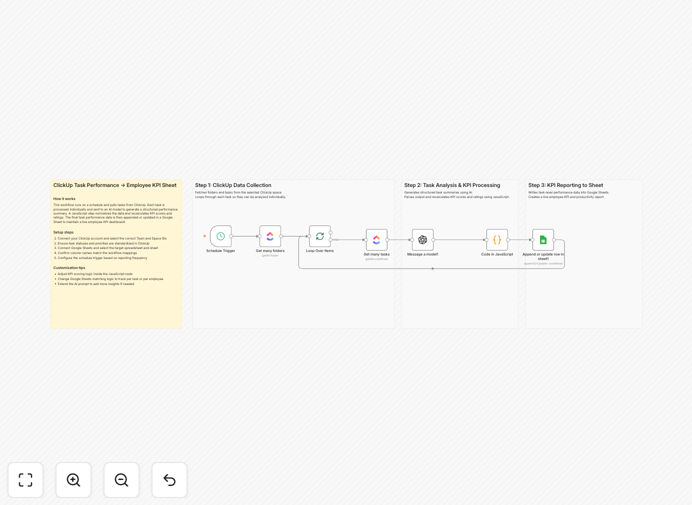
AI-powered employee performance tracking workflow connecting ClickUp, GPT-4.1, and Google Sheets

What This Workflow Does

Manual employee performance reviews are time‑consuming, subjective, and often lag behind real‑time work. This automation solves that by turning ClickUp task data into actionable KPIs automatically.

The workflow runs on a schedule, fetching tasks from ClickUp folders, sending them to GPT‑4.1 for structured evaluation, and writing the results—including productivity scores, completion rates, and quality insights—into a Google Sheets dashboard. Managers get a continuously updated view of team performance without manual data crunching.

It transforms raw task lists into quantified metrics: who’s exceeding expectations, who’s falling behind, and where coaching or resources are needed. This shifts performance management from periodic, stressful reviews to continuous, data‑driven insight.

How It Works

Step 1: Scheduled Data Collection

A Schedule Trigger starts the workflow daily or weekly. It connects to ClickUp and retrieves all tasks from specified spaces or folders. The Loop Over Items node iterates through each folder to ensure every task is processed.

Step 2: AI‑Powered Analysis

Each task’s details—title, description, status, assignee, due date, comments—are sent to GPT‑4.1 via the OpenAI node. The AI generates a summary, assigns a preliminary performance score, and highlights key patterns (e.g., “consistently meets deadlines,” “requires frequent revisions”).

Step 3: Score Standardization & Output

A JavaScript node cleans and standardizes the AI output, converting qualitative notes into numerical KPIs (1‑10 scale). It also flags overdue tasks and high‑priority items. Finally, the Google Sheets node appends or updates a row for each employee, building a real‑time dashboard.

Who This Is For

This template is ideal for:

  • Team Leads & Managers who need objective performance data without manual tracking.
  • HR Departments seeking automated, bias‑reduced insights for promotion and compensation decisions.
  • Remote‑Work Companies that rely on digital task management and need visibility into distributed team productivity.
  • Startups & Scale‑ups where rapid growth makes manual reviews impractical.
  • Consulting & Service Firms that bill based on deliverables and need to monitor project execution efficiency.

What You'll Need

  1. A ClickUp account with tasks organized in spaces/folders.
  2. Google Sheets set up with a sheet ready for KPI data (columns: Employee, Date, Task Count, Completion Rate, AI Score, Summary).
  3. Access to GPT‑4.1 (OpenAI API key or equivalent AI service).
  4. An n8n instance (cloud or self‑hosted) with the ClickUp, OpenAI, and Google Sheets nodes installed.
  5. Basic understanding of your desired KPIs (what metrics matter for your team).

Quick Setup Guide

Import and configure this workflow in under 15 minutes:

  1. Download the template using the button above and import it into your n8n workspace.
  2. Connect your ClickUp account in the first node, selecting the space/folder containing employee tasks.
  3. Set up your OpenAI credentials in the Message a Model node, adjusting the prompt if you want different evaluation criteria.
  4. Link your Google Sheets in the final node, specifying the sheet and tab where KPI data should land.
  5. Adjust the schedule—set the trigger to run daily for real‑time dashboards or weekly for summary reports.
  6. Test with a single folder to verify data flows correctly, then expand to all relevant spaces.

Pro tip: Customize the AI prompt to evaluate task quality, collaboration, and initiative—not just completion. Add criteria like “mentions in comments,” “attachments added,” or “complexity level” to get richer insights.

Key Benefits

Save 5–10 hours per month per manager on performance data collection and manual reporting. The workflow does the gathering, analysis, and logging automatically.

Reduce bias in evaluations by using AI‑generated scores based on actual task data, not subjective impressions.

Enable proactive coaching with real‑time dashboards that show who’s struggling with deadlines or complexity, allowing timely support.

Improve retention & alignment by recognizing high performers faster and aligning individual outputs with company goals.

Scale performance tracking across large or distributed teams without adding administrative overhead.

Frequently Asked Questions

Common questions about employee performance automation and integration

Automating employee performance tracking eliminates manual reporting, provides consistent KPI scoring across all tasks, and gives managers real‑time visibility into productivity trends. It saves hours per week on data collection and analysis, reduces human bias in evaluations, and creates a centralized dashboard for strategic decision‑making.

For example, a marketing team can automatically see which members consistently deliver high‑quality campaigns ahead of deadline, versus those needing support. This data‑driven approach replaces guesswork with evidence.

  • Reduces administrative overhead by 80%
  • Provides objective, quantifiable metrics
  • Enables continuous feedback instead of annual reviews

AI can analyze task completion rates, quality, timeliness, and complexity objectively, generating structured summaries and scores without emotional bias. It identifies patterns managers might miss, like recurring bottlenecks or skill gaps, and provides actionable insights for coaching and resource allocation.

Instead of relying on memory or anecdotal evidence, AI reviews every task an employee completed, assessing consistency, initiative, and collaboration signals (comments, attachments). This creates a comprehensive, evidence‑based performance profile.

Yes, the workflow logic is adaptable. You can replace the ClickUp node with integrations for Asana, Jira, Trello, or Monday.com. The AI analysis and Google Sheets output remain the same. n8n supports over 400 apps, so you can customize the data source to fit your existing tools.

The key is ensuring your project management tool provides task details (assignee, status, due date, description) via API. Most modern platforms offer this. The workflow then processes that data identically, turning it into KPIs.

AI can evaluate completion rate, timeliness (deadline adherence), task complexity handled, collaboration indicators (comments, attachments), quality signals (revisions, approvals), and initiative (self‑assigned tasks). It can also detect patterns like recurring delays or high‑impact contributions that manual reviews often overlook.

By analyzing task descriptions and metadata, AI can infer whether work was routine or innovative, whether dependencies were managed well, and whether communication was proactive. These nuanced insights go beyond simple completion counts.

  • Timeliness score based on due‑date vs completion‑date
  • Quality score from revision count and approval status
  • Collaboration score from comment/attachment activity

When self‑hosted on n8n, all data stays within your infrastructure. No third‑party cloud processing. API credentials are encrypted, and you control access. For cloud versions, ensure your n8n instance uses encrypted connections and complies with your data governance policies.

Employee performance data is sensitive. Best practice is to run n8n on your own servers, use secure API keys, and restrict Google Sheets access to authorized managers. The workflow doesn’t store data externally unless you configure it to.

ROI includes reduced administrative overhead (5–10 hours/month per manager), faster promotion/compensation decisions, improved team productivity via targeted coaching, and retention of top performers through timely recognition. Automated insights also help align individual goals with company objectives more effectively.

For a 50‑person team, manual reviews might consume 200 hours annually. Automation cuts that to near zero, while improving decision accuracy. The ROI compounds as team size grows and performance visibility becomes strategic.

For real‑time dashboards, run daily or weekly. For quarterly reviews, schedule monthly aggregations. Adjust frequency based on team size and review cycles. High‑growth teams benefit from weekly insights; stable teams may prefer monthly summaries. The workflow can be scheduled flexibly in n8n.

Running daily ensures managers see overdue tasks and performance dips immediately. Weekly runs provide trend analysis without overwhelming data. Monthly runs suit formal review cycles. You can also trigger manually before meetings.

Yes, GrowwStacks specializes in building tailored automation systems. We can adapt this template to your specific KPIs, integrate with your HR software, add Slack/Teams notifications, create advanced scoring models, and ensure compliance with your data policies. Book a free consultation to discuss your needs.

Customizations include adding sentiment analysis from task comments, integrating with payroll systems for bonus calculations, generating personalized coaching emails, or building multi‑team dashboards with role‑based access. We design workflows that fit your exact processes.

  • Integration with your existing HRIS or ATS
  • Custom AI prompts aligned with your evaluation criteria
  • Real‑time alerts for performance thresholds

Need a Custom Employee Performance Automation?

This free template is a starting point. Our team builds fully tailored automation systems for your specific business needs.