Zapier Google Sheets Slack AI Agent Personal Finance

Track Personal Finances in Google Sheets with an AI Agent via Slack

Automate expense logging, debt tracking, and balance updates using natural language commands in Slack. Free n8n workflow template.

Download Template JSON · n8n compatible · Free
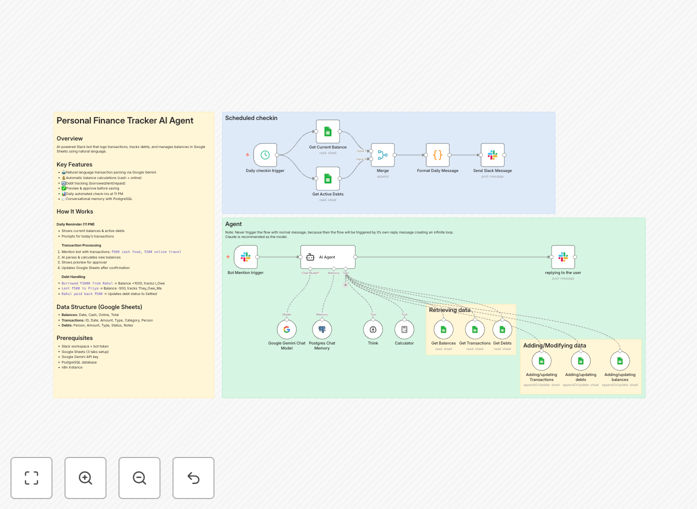
AI-powered personal finance automation workflow connecting Slack, AI, and Google Sheets

What This Workflow Does

Manually logging every coffee, grocery run, or money you lent a friend into a spreadsheet is tedious and easy to forget. This automation solves that by turning your Slack workspace into a personal finance assistant. You simply message the bot in plain English like "₹500 cash food" or "borrowed ₹1000 from John," and the AI agent intelligently parses the transaction, calculates your updated balances, and logs everything into your Google Sheets—after showing you a preview for approval.

The workflow maintains a conversational memory, so you can reference past transactions naturally. It also sends you a daily summary at 11 PM with your current cash and online balances, plus any active debts. It's designed for individuals, freelancers, or small teams who want detailed financial records without the friction of traditional budgeting apps.

Beyond simple expense tracking, it handles the nuances of personal finance: separating cash and digital payments, tracking who owes you money (and who you owe), managing repayments, and categorizing spending—all through a simple, chat-based interface you already use daily.

How It Works

The automation runs on two parallel tracks: a scheduled daily check-in and an on-demand AI agent triggered by Slack mentions.

1. Scheduled Daily Summary

Every day at 11 PM, the workflow automatically fetches the latest balances from your Google Sheets, retrieves all active debts, and sends you a formatted Slack message. This serves as both a daily financial snapshot and a gentle prompt to log any transactions from the day.

2. AI-Powered Transaction Processing

When you mention the bot in Slack (e.g., @FinanceBot ₹200 online shopping), a multi-phase process begins:

Phase 1 - Parse & Analyze: The AI (Google Gemini) extracts the amount, payment type (cash/online), category, and transaction type (expense, income, borrowed, lent, repaid). It uses PostgreSQL to remember the context of your conversation.

Phase 2 - Calculate & Preview: The system reads your current balances from Google Sheets, applies the transaction, and sends you a clear preview of the changes. You simply reply "yes" to approve or "no" to cancel.

Phase 3 - Update Database: Upon approval, the workflow generates a unique transaction ID, timestamps the entry, updates the debt records if applicable, and writes the new balances and transaction details to your Google Sheets.

Phase 4 - Confirmation: You receive a success message in Slack with your updated balances and a summary of active debts, completing the loop.

Who This Is For

This template is ideal for:

  • Individuals and Freelancers who want to track personal and business expenses without manual data entry.
  • People who lend/borrow money frequently and need a system to track who owes what.
  • Teams or households sharing expenses who want a central, transparent record.
  • Anyone comfortable with Slack who prefers conversational commands over form-based apps.
  • Tech-savvy users looking to experiment with AI agent automation for practical daily tasks.

What You'll Need

  1. An n8n instance (cloud or self-hosted).
  2. A Slack workspace with permission to create apps.
  3. A Google account to create and access a Google Sheets spreadsheet.
  4. A Google Gemini API key (free tier available).
  5. A PostgreSQL database (a free Supabase instance works perfectly).
  6. Basic familiarity with connecting APIs and following setup guides.

Pro tip: While the template uses Google Gemini, the notes suggest Claude might provide better results for financial parsing. You can easily swap the AI model node if you have access to Claude's API.

Quick Setup Guide

  1. Download & Import: Click the "Download Template" button and import the JSON file into your n8n instance.
  2. Prepare Your Google Sheet: Create a new Sheet with three tabs named exactly Balances, Transactions, and Debts. Add the required header rows as shown in the template documentation.
  3. Create a Slack App: Go to api.slack.com/apps, create a new app, and add the Bot Token Scopes: app_mentions:read, chat:write, and channels:read. Install it to your workspace and note the Bot User OAuth Token.
  4. Get Your AI Key: Obtain a free API key from ai.google.dev for Google Gemini.
  5. Set Up PostgreSQL: Create a new database (Supabase is recommended for a free, easy start). Note your connection details.
  6. Configure n8n Credentials: In your n8n workflow, set up credentials for Google Sheets (OAuth2), Slack API (using your Bot Token), Google Gemini API, and PostgreSQL.
  7. Update Node Parameters: Point all Google Sheets nodes to your new spreadsheet, select your Slack channel, and set a unique session key in the PostgreSQL Chat Memory node.
  8. Activate & Test: Turn on the workflow, invite your Slack bot to a channel, and send a test message like @YourBot ₹100 cash lunch. Approve the preview and verify the Sheet updates.

Key Benefits

Save 5+ hours per month by eliminating manual spreadsheet updates. What used to be a weekly chore becomes a few seconds of conversation.

Eliminate data entry errors with AI-powered parsing that consistently categorizes transactions, ensuring your financial records are accurate and reliable.

Gain real-time financial visibility with daily balance summaries and an always-up-to-date transaction log, helping you make better spending decisions.

Never forget who owes you money again. The system automatically tracks debts, marks them as settled upon repayment, and includes them in your daily summaries.

Use tools you already know—Slack for input, Google Sheets for storage—reducing the learning curve and making financial tracking a natural part of your workflow.

Frequently Asked Questions

Common questions about personal finance automation and integration

The most efficient way is to combine a conversational interface like Slack with a spreadsheet like Google Sheets, powered by an AI agent. This lets you log transactions naturally (e.g., 'spent $20 on lunch') and have them automatically categorized, calculated, and recorded without manual data entry. It turns a tedious chore into a simple conversation.

This approach leverages tools you already use daily. Instead of opening a separate app or spreadsheet, you just send a message where you already communicate. The automation handles the structuring, math, and storage behind the scenes.

Absolutely. AI agents can understand natural language, categorize expenses, calculate running balances, and even provide spending insights. By connecting an AI model (like Google Gemini) to your spreadsheet, you can ask questions about your finances, get summaries, and log transactions through chat, making budget management feel effortless and integrated into your daily communication tools.

For example, you can ask "How much did I spend on food last month?" and the AI can query your transaction history, sum the relevant categories, and give you an answer directly in Slack, all without you touching a spreadsheet.

Slack acts as the input channel where you send your financial messages. An automation platform like n8n listens for these messages, uses an AI to extract the key details (amount, category, person), performs calculations, and then writes the structured data into specific rows and columns in your Google Sheets. This creates a seamless bridge between casual conversation and structured financial record-keeping.

The connection is secure and direct. Your Slack message triggers the workflow, the AI interprets it, and n8n uses official APIs to update your spreadsheet. You maintain full ownership of all data, which resides solely in your Google account.

Automating finance tracking saves significant time, reduces human error, and provides real-time visibility into your spending. Key benefits include: eliminating manual spreadsheet updates, ensuring consistent categorization, getting instant balance updates, tracking debts automatically, receiving daily summaries, and having a searchable log of all transactions without any extra effort after setup.

Beyond efficiency, it creates a habit of tracking. Because it's as easy as sending a Slack message, you're more likely to log small transactions consistently, leading to a complete and accurate financial picture.

When set up correctly through a trusted automation platform like n8n, it is secure. The connection uses OAuth for Google Sheets and Slack's secure bot tokens. Your financial data stays within your own Google Sheets and database; the AI only processes the text of your message temporarily to extract information. You maintain full control over your data, unlike with third-party budgeting apps.

For maximum security, you can self-host n8n and use your own private database. This ensures no financial data ever passes through a third-party cloud service unless you choose to use one.

Yes, a well-designed finance automation can separate cash and digital (online/bank) balances. The AI agent can be instructed to recognize payment methods from your messages (e.g., 'cash' vs 'card'). The workflow then updates separate columns in your spreadsheet, giving you a clear view of your physical cash on hand versus your bank account balance, all from simple Slack commands.

This is crucial for accurate budgeting. Knowing how much cash you have left for the week, separate from your online balance, prevents overdrafts and helps with envelope-style budgeting directly within your automation.

The AI agent is given a system prompt that defines key transaction types: expenses, income, money lent, money borrowed, and repayments. It uses natural language processing to match your phrases against these definitions. For example, 'lent $50 to Alex' triggers a 'They_Owe_Me' record. This logic allows the system to manage complex interpersonal finances automatically.

The system can be trained on your specific phrasing. If you always say "spot me" instead of "lend," you can adjust the prompt. This flexibility makes the automation adaptable to your personal vocabulary and financial relationships.

Yes, GrowwStacks specializes in building tailored automation systems for businesses. While this template is for personal use, we can design a robust financial tracking system for your company that integrates with your CRM, accounting software, and internal communication tools. We handle the complex logic, security, and scalability so you get a system that fits your exact workflow and reporting needs.

We can extend this concept to handle expense approvals, multi-user logging, department-level budgets, automated reporting, and integration with tools like QuickBooks, Xero, or your proprietary software. Book a free consultation to discuss transforming your business's financial operations.

Need a Custom Personal Finance Automation?

This free template is a starting point. Our team builds fully tailored automation systems for your specific business needs.