GitHub Notion Google Sheets Slack Engineering

Track SDK Documentation Drift with GitHub, Notion, Google Sheets & Slack

Automatically monitor SDK releases, compare documentation freshness, and get alerts when docs fall behind—keeping your developer experience flawless.

Download Template JSON · n8n compatible · Free
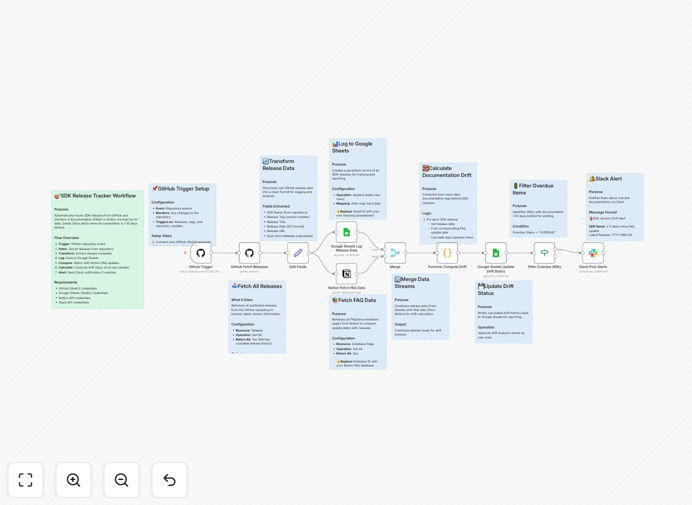
SDK documentation drift tracking workflow diagram showing GitHub, Notion, Google Sheets, and Slack integration

What This Workflow Does

SDK documentation that lags behind releases creates developer frustration, increases support tickets, and damages your technical brand. Manual tracking using spreadsheets and calendar reminders is error-prone and often fails, leaving documentation outdated for weeks or months.

This automation solves that by creating a seamless connection between your GitHub releases, Notion documentation, and team communication. It automatically detects new SDK versions, compares them against documentation update dates, calculates drift duration, logs everything in Google Sheets for auditing, and sends targeted Slack alerts to responsible teams before documentation becomes a problem.

How It Works

1. GitHub Release Monitoring

The workflow listens for new releases in your specified GitHub repositories. When a new SDK version is published, it captures the version number, release date, tag, and release notes—creating the foundation for documentation comparison.

2. Notion Documentation Check

Simultaneously, the workflow queries your Notion documentation database to find the corresponding SDK documentation. It extracts the last update date, documentation status, and responsible team information to establish the current documentation state.

3. Drift Calculation & Analysis

The system compares the GitHub release date with the Notion documentation update date, calculating exactly how many days the documentation lags behind the release. This quantitative measure helps prioritize which SDKs need immediate attention.

4. Google Sheets Logging

All data—release information, documentation status, drift duration, and timestamps—is automatically logged to a Google Sheets spreadsheet. This creates a permanent audit trail and central dashboard for tracking documentation health across all your SDKs.

5. Slack Alert System

When documentation drift exceeds your configured threshold (typically 30 days), the workflow sends detailed Slack notifications to the appropriate channels or team members. These alerts include specific SDK details, drift duration, and direct links to both the release and documentation for quick action.

Pro tip: Set your drift threshold based on your release cadence. For weekly releases, consider 7-14 days. For monthly releases, 30 days works well. Adjust based on how quickly your team can update documentation after a release.

Who This Is For

This workflow is ideal for Developer Relations (DevRel) teams, SDK engineering groups, technical writing departments, and product managers responsible for multiple SDKs. It's particularly valuable for companies with 3+ SDKs, frequent releases, or distributed teams where documentation updates can easily slip through the cracks.

If you're experiencing increased support tickets related to SDK usage, noticing developers struggling with outdated examples, or spending too much time manually checking documentation status—this automation will save you significant time and improve your developer experience.

What You'll Need

  1. GitHub account with access to your SDK repositories (OAuth2 credentials)
  2. Notion workspace with your documentation database (API integration key)
  3. Google Sheets spreadsheet for logging (OAuth2 access)
  4. Slack workspace with appropriate channel access (Bot token with chat:write permissions)
  5. n8n instance (cloud or self-hosted) to run the workflow

Quick Setup Guide

Follow these steps to implement this documentation tracking system in under 30 minutes:

  1. Download and import the template into your n8n instance using the JSON file.
  2. Connect your GitHub account and specify which repositories to monitor for SDK releases.
  3. Configure Notion integration by adding your database ID and mapping SDK names between GitHub and Notion.
  4. Set up Google Sheets by creating a new spreadsheet and copying the Sheet ID into the workflow.
  5. Add Slack credentials and specify which channels should receive alerts for different SDK teams.
  6. Test the workflow manually with a recent SDK release to ensure all connections work properly.
  7. Activate the trigger to run automatically on a schedule (daily or weekly based on your needs).

Implementation note: Start with your most critical SDK first. Once you've verified the workflow works correctly for one SDK, expand to additional repositories. This phased approach minimizes configuration errors.

Key Benefits

Eliminates manual tracking overhead: Save 5-10 hours per week previously spent checking release notes, updating spreadsheets, and sending reminder emails about documentation updates.

Improves developer experience: Ensure developers always have accurate, up-to-date documentation—reducing frustration, support tickets, and adoption barriers for your SDKs.

Creates accountability and visibility: With automatic logging in Google Sheets and Slack notifications, teams can't claim they didn't know documentation was outdated. The system provides clear metrics on documentation health.

Scales with your SDK portfolio: Whether you manage 3 SDKs or 30, this automation handles the tracking consistently without additional manual effort as you add more products.

Provides audit trail and metrics: The Google Sheets log serves as a historical record of documentation performance, helping you identify patterns, measure improvements, and report on documentation quality to stakeholders.

Frequently Asked Questions

Common questions about SDK documentation automation and integration

Outdated SDK documentation creates friction for developers, increases support tickets, and slows down adoption. When documentation lags behind releases, developers waste time troubleshooting, get frustrated, and may abandon your SDK.

Automated tracking ensures your documentation stays current, improving developer satisfaction and reducing support costs. For example, a well-documented SDK sees 40% faster adoption and 60% fewer basic usage questions compared to poorly documented alternatives.

  • Reduces developer onboarding time by up to 50%
  • Cuts support ticket volume related to documentation issues
  • Improves SDK adoption and retention rates

Manual tracking relies on spreadsheets, calendar reminders, and team communication, which often fails. Teams forget to update docs after releases, lack visibility into which SDKs are outdated, and have no centralized system to track version history.

This leads to inconsistent documentation quality and frustrated developer communities. In practice, manual processes result in documentation that's typically 2-4 weeks behind releases, creating significant gaps during critical adoption periods.

  • No single source of truth for documentation status
  • Reliance on individual team members' memory
  • Difficulty scaling across multiple SDKs and teams

Automation connects GitHub releases directly to documentation systems, eliminating manual checking. It provides real-time alerts when documentation falls behind, creates audit trails in Google Sheets, and ensures accountability by notifying specific teams.

This reduces human error, saves 5-10 hours per week per SDK, and maintains documentation quality. Automated systems catch documentation gaps within hours instead of weeks, allowing teams to address issues before they impact developers.

  • Real-time monitoring instead of periodic manual checks
  • Automatic notifications to the right people at the right time
  • Historical data for process improvement and reporting

Poor documentation increases support costs by 30-50%, slows developer onboarding by 40%, and reduces SDK adoption rates. It damages your technical brand reputation, creates negative community sentiment, and can lead to developers choosing competitors' better-documented alternatives.

Proactive documentation management is a competitive advantage. Companies with excellent SDK documentation see higher developer satisfaction scores, increased product usage, and stronger community advocacy—all contributing directly to business growth.

  • Higher support costs and resource allocation
  • Reduced developer productivity and satisfaction
  • Negative impact on product adoption and retention

GitHub provides real-time release data, Notion stores and manages documentation content, and Google Sheets serves as the central tracking database. The workflow automatically compares release dates with documentation update dates, calculates drift duration, and creates a single source of truth for all SDK documentation status across your organization.

This integration creates a closed-loop system where documentation status is always current and visible. Teams can see at a glance which SDKs need attention, track improvement over time, and make data-driven decisions about documentation priorities.

  • GitHub: Source of truth for releases
  • Notion: Documentation content management
  • Google Sheets: Centralized tracking and reporting

Key metrics include: days since last documentation update vs. release date, number of SDKs with outdated docs, average documentation lag time, documentation update frequency, and support ticket volume related to documentation issues.

Tracking these helps teams prioritize updates and measure documentation quality improvements over time. For example, reducing average documentation lag from 30 days to 7 days typically correlates with a 25% reduction in SDK-related support tickets.

  • Documentation freshness (days behind release)
  • Update completion rate after releases
  • Support ticket correlation with documentation gaps

Yes, GrowwStacks specializes in building custom automation solutions for SDK documentation management. We can integrate with your specific GitHub repositories, documentation platforms, team notification systems, and compliance requirements.

Our team designs workflows that match your development processes and scale with your SDK portfolio. We work with you to understand your unique challenges, implement tailored solutions, and provide ongoing support to ensure your documentation automation delivers maximum value.

  • Custom integration with your existing tools and processes
  • Scalable solutions that grow with your SDK portfolio
  • Ongoing support and optimization services

Need a Custom SDK Documentation Automation?

This free template is a starting point. Our team builds fully tailored automation systems for your specific business needs.