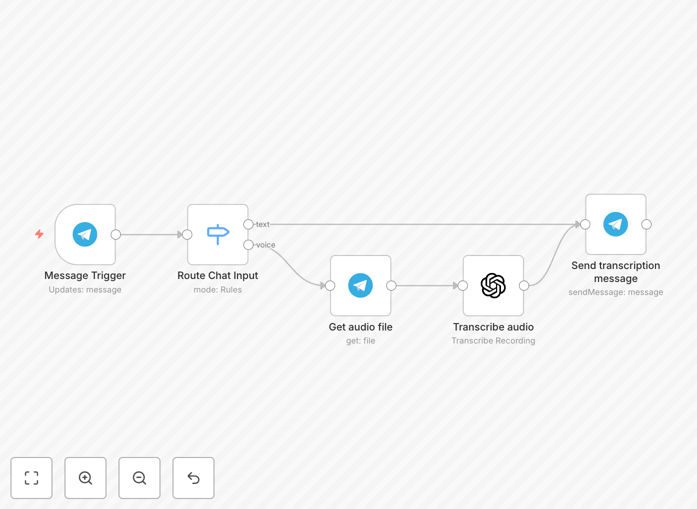
What This Workflow Does
This automation solves a common modern communication problem: the inefficiency of voice messages. While convenient for the sender, listening to and processing voice notes is time-consuming for the receiver, especially in business contexts. This n8n workflow automatically listens for new messages in a Telegram chat or group, intelligently identifies whether the message is text or a voice note, and if it's a voice note, sends it to OpenAI's powerful Whisper-1 model for accurate speech-to-text transcription.
The result is a seamless pipeline where voice communication is instantly transformed into written text. This text can then be logged, analyzed, forwarded, or integrated into other business systems. It bridges the gap between the informal ease of voice messaging and the practical, searchable, and actionable nature of written text.
Beyond simple transcription, this workflow acts as a foundational layer for more complex AI-driven processes. The resulting text is primed for further analysis—it can be fed into a Large Language Model (LLM) for summarization, sentiment analysis, or automated response generation, creating a powerful AI assistant that understands spoken requests.
How It Works
The workflow follows a logical, step-by-step process to ensure reliable transcription.
Step 1: Message Trigger
The workflow is activated by the "Telegram Trigger" node. This node continuously monitors a specified Telegram chat or channel for any new incoming messages. It captures all message data, including metadata like sender ID, timestamp, and crucially, the message type (text, voice, photo, etc.). This sets the entire automation in motion.
Step 2: Content Routing with Switch Node
A "Switch" node acts as the brain of the operation. It examines the incoming message data to determine its type. If the message is plain text, it routes the flow down the "text" branch, bypassing the transcription process entirely. If the message contains a "voice" attachment, it routes the flow down the "voice" branch to be processed. This ensures the workflow only uses resources (and incurs OpenAI costs) when necessary.
Step 3: Audio File Retrieval
For voice messages, the "Get Audio File" node springs into action. It uses the unique file ID provided by Telegram's API to download the actual audio file (usually in .oga format) to the n8n server's temporary memory. This step is essential because the Whisper API requires the audio file itself, not just a reference link.
Step 4: AI-Powered Transcription
The downloaded audio file is passed to the "OpenAI Transcribe Recording" node. This node sends the audio to OpenAI's Whisper-1 model, a state-of-the-art speech recognition system. The model processes the audio, converts the spoken words into accurate text, and returns the transcript. You can configure the node for specific languages or prompt it for better results with technical jargon.
Step 5: Output and Integration
Finally, the transcribed text (or the original text if it was a text message) is passed to a "Send Message" or similar output node. This is where you define what happens next. The text could be sent back to the user in Telegram, appended to a Google Sheet, created as a note in Notion, posted to a Slack channel for team visibility, or saved to a database.
Pro tip: Add a "Function" node after the transcription to clean the text (remove filler words like "um," "ah") or format it before sending it to its final destination. This improves readability for end-users or downstream systems.
Who This Is For
This template is incredibly versatile and serves a wide range of users and use cases:
Customer Support Teams: Receive voice support queries via Telegram and automatically convert them into text for your ticketing system (Zendesk, Freshdesk). This creates a searchable log and allows for faster ticket triage and assignment.
Remote Teams & Project Managers: Team members can send quick voice updates. The transcriptions are automatically posted to a project channel in Slack or Microsoft Teams, or added as a comment on a task in Asana or Trello, keeping everyone in the loop without requiring anyone to listen to audio.
Content Creators & Journalists: Conduct interviews or record ideas via Telegram voice messages. Get instant transcripts that can be easily edited into articles, scripts, or social media posts, saving hours of manual transcription work.
Accessibility Advocates: Make group chats or announcements more accessible by providing automatic text transcripts of voice messages for deaf or hard-of-hearing participants, fostering more inclusive communication.
Personal Productivity Enthusiasts: Use Telegram as a quick voice memo app. Speak your thoughts, to-dos, or ideas and have them transcribed and sent to your note-taking app like Evernote or Obsidian, creating a searchable personal knowledge base.
What You'll Need
- A Telegram Bot Token: Created via BotFather on Telegram. This token allows the workflow to connect to and listen for messages in your chosen chat or group.
- An OpenAI API Key: Obtainable from your OpenAI account dashboard. This key authenticates requests to the Whisper-1 model for transcription.
- An n8n Instance: You can use the cloud version for simplicity or self-host n8n on your own server for maximum data control and privacy.
- Basic Understanding of API Keys: You'll need to know how to copy and paste your Telegram Bot token and OpenAI API key into the respective nodes in the workflow settings.
Quick Setup Guide
Follow these steps to get your voice-to-text pipeline running in under 10 minutes.
- Import the Template: Click the "Download Template" button above to get the JSON file. In your n8n instance, go to "Workflows" > "Import from File" and select the downloaded file.
- Configure Telegram Trigger: Open the "Telegram Trigger" node. Click "Add Credential" and select "Telegram Bot API." Paste your Bot Token from BotFather. Set the "Updates" field to "message" to listen for new messages.
- Set Up OpenAI Node: Open the "OpenAI" node. Click "Add Credential" and select "OpenAI API." Paste your OpenAI API Key. Ensure the "Resource" is set to "Transcription" and the "Model" is "whisper-1."
- Test the Connection: Activate the workflow (toggle the "Active" switch). Send a voice message to your Telegram bot. You should see the execution appear in n8n, and the transcribed text will be output by the final node.
- Connect Your Destination: Replace the final "Send Message" node with your desired action. Connect it to Google Sheets, Notion, Email, or another app to store or forward the transcripts.
Pro tip: Before going live, test with short, clear voice messages. Check the OpenAI node's "Options" to set the language if you're transcribing non-English audio, which can significantly improve accuracy.
Key Benefits
Eliminate Manual Transcription Drudgery: Save hours per week that would otherwise be spent listening and typing. What used to take 5 minutes per message now happens instantly in the background.
Create Searchable Records: Text logs are instantly searchable by keyword. Find specific customer complaints, project notes, or action items in seconds, something impossible with audio files.
Improve Team Accessibility & Accountability: Written transcripts ensure everyone on the team has access to the same information, regardless of hearing ability or time zone. It also creates an unambiguous written record for compliance or reference.
Unlock Advanced AI Processing: Text data is the fuel for modern AI. With transcripts, you can easily add a second AI step for summarization, translation, sentiment analysis, or automatic categorization, multiplying the value of the initial automation.
Scale Customer Support Seamlessly: Handle a higher volume of voice-based inquiries without hiring more staff. Automatically log, tag, and route support requests based on the transcribed content, improving response times and customer satisfaction.