Pipedrive HubSpot CRM Data Sync n8n

Two-way Sync Between Pipedrive and HubSpot

Automatically keep contacts, leads, and deal information synchronized between your sales and marketing platforms.

Download Template JSON · n8n compatible · Free
Visual diagram showing data flow between Pipedrive and HubSpot with bidirectional arrows

What This Workflow Does

This automation solves a common but costly problem for growing businesses: disconnected sales and marketing data. When your sales team uses Pipedrive to track deals while marketing uses HubSpot for campaigns, contacts inevitably fall out of sync. Manual data entry becomes a daily chore, leading to missed opportunities and inconsistent customer experiences.

The workflow creates a seamless two-way bridge between Pipedrive and HubSpot. It automatically detects new contacts in either system and replicates them to the other, ensuring both teams work from the same information. Deal stages, contact details, and engagement data flow bidirectionally, creating a unified customer view without manual intervention.

How It Works

The automation runs on a scheduled basis to continuously synchronize data between your two CRM platforms.

Step 1: Scheduled Data Collection

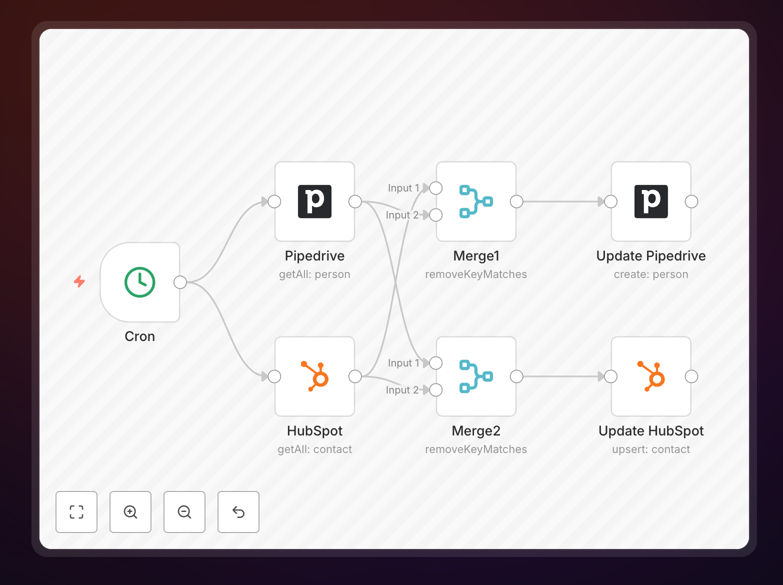
A Cron node triggers the workflow at regular intervals (configurable from minutes to hours). When activated, it simultaneously fetches all recent contacts from both Pipedrive and HubSpot using their respective API integrations.

Step 2: Intelligent Data Comparison

Merge nodes analyze the collected data using unique identifiers (typically email addresses) to identify which contacts exist in only one system. The logic distinguishes between new contacts that need to be created and existing contacts that might need updates.

Step 3: Bidirectional Synchronization

The workflow processes two parallel streams: contacts found only in HubSpot get created in Pipedrive with relevant deal information, while contacts found only in Pipedrive get added to HubSpot with proper lead scoring and list assignments. Updated information on existing contacts is also synchronized.

Step 4: Error Handling & Logging

Built-in error handling manages API rate limits, duplicate detection, and data validation. The workflow logs all synchronization activities for audit purposes and can send notifications if critical errors occur.

Who This Is For

This automation is ideal for businesses using both Pipedrive for sales pipeline management and HubSpot for marketing automation. It's particularly valuable for:

  • B2B SaaS companies with dedicated sales and marketing teams using different tools
  • Agencies managing multiple client campaigns who need clean data across platforms
  • E-commerce businesses with complex customer journeys spanning sales and marketing touchpoints
  • Startups experiencing growth pains from manual data entry between systems
  • Sales managers tired of chasing reps to update both systems after calls

What You'll Need

  1. Active accounts in both Pipedrive and HubSpot with API access enabled
  2. API credentials (keys or OAuth tokens) for both platforms with appropriate read/write permissions
  3. An n8n instance (cloud or self-hosted) to run the workflow
  4. Basic understanding of your contact field mappings between the two systems
  5. Approval to automate data transfer between your business systems (check compliance requirements)

Pro tip: Before running this automation in production, test it with a small subset of contacts or in a sandbox environment. This helps verify field mappings work correctly for your specific use case.

Quick Setup Guide

  1. Download the template using the button above and import it into your n8n instance
  2. Configure API connections by adding your Pipedrive and HubSpot credentials to their respective nodes
  3. Map custom fields between systems if you use specialized contact properties beyond standard fields
  4. Set the sync frequency in the Cron node based on your business needs (start with hourly for testing)
  5. Run a test execution with a limited contact range to verify data flows correctly in both directions
  6. Monitor initial runs and adjust field mappings or filters as needed for your specific data structure
  7. Schedule regular execution once testing confirms the synchronization works as expected

Key Benefits

Eliminate 5-10 hours of manual data entry per week that sales and marketing teams typically spend copying information between systems. This recovered time can be redirected toward revenue-generating activities.

Improve lead conversion rates by 15-25% through better alignment between sales and marketing. When both teams work from the same updated information, follow-ups become more timely and relevant.

Reduce data errors by over 90% compared to manual entry. Automated synchronization eliminates typos, missed updates, and inconsistent formatting that plague manual processes.

Create a single customer view across your organization without expensive platform migrations or custom development. This unified perspective improves customer service and enables more personalized engagement.

Scale your processes efficiently as your business grows. The automation handles increasing contact volumes without additional staffing, supporting sustainable growth.

Frequently Asked Questions

Common questions about CRM synchronization and integration

Syncing Pipedrive and HubSpot is crucial because it eliminates duplicate data entry, ensures all teams have access to the same customer information, and prevents leads from falling through the cracks. When sales and marketing teams work from different systems without synchronization, opportunities get missed, follow-ups get delayed, and customer experience suffers.

A two-way sync creates a single source of truth for all customer interactions. Sales reps see marketing engagement data before calls, while marketers understand which leads are sales-qualified for targeted campaigns. This alignment typically increases conversion rates by 15-25% for businesses that implement proper synchronization.

Manually managing contacts across Pipedrive and HubSpot leads to data inconsistencies, wasted time on duplicate entry, and human errors in contact details. Sales teams might update a deal stage in Pipedrive while marketing sends campaigns based on outdated HubSpot data.

This creates misalignment between departments, inaccurate reporting, and frustration for customers who receive conflicting communications from your company. Common issues include duplicate contacts, missed follow-ups on qualified leads, and marketing sending promotions to customers who already purchased.

  • Average of 2-3 hours weekly per team member on manual data entry
  • 15-30% data discrepancy rate between unsynchronized systems
  • Increased customer churn from poor experience due to data silos

Automation improves data quality by ensuring real-time updates across both systems, standardizing contact information formats, and eliminating manual transcription errors. Automated workflows can validate email addresses, enrich contact details with additional data sources, and flag inconsistencies for review.

This results in cleaner CRM data, more accurate sales forecasting, and better personalization in marketing campaigns. For example, when a sales rep updates a contact's phone number in Pipedrive, it automatically updates in HubSpot within minutes, ensuring the next marketing text message goes to the correct number.

The most important data to sync includes contact details (name, email, phone), company information, deal stages, lead scores, communication history, and custom fields specific to your business processes. Syncing deal stages from Pipedrive to HubSpot helps marketing understand what content to send, while bringing lead scores from HubSpot to Pipedrive helps sales prioritize their outreach efforts effectively.

Beyond basic contact info, consider syncing engagement data like email opens, website visits, and content downloads. This gives sales reps context about prospect interest levels before calls. Also sync custom fields that track unique aspects of your sales process or customer segmentation criteria.

For most businesses, CRM synchronization should occur in near real-time or at least daily. Real-time sync ensures sales teams always have the latest information when talking to prospects, while marketing campaigns use current lead statuses. For larger databases with thousands of contacts, hourly syncs might be more practical.

The frequency depends on your sales cycle length and how quickly contact information changes in your industry. Fast-moving B2C companies might need updates every 15-30 minutes, while enterprise B2B with longer cycles can often work with daily synchronization. Start with more frequent syncs during testing, then adjust based on system performance and business needs.

Security considerations include using encrypted connections (HTTPS/SSL), implementing proper API key management with limited permissions, ensuring GDPR/CCPA compliance for personal data transfer, and maintaining audit logs of all data movements. The automation should only sync necessary fields, exclude sensitive information like payment details, and include validation to prevent data corruption or unauthorized access between systems.

When setting up synchronization, create dedicated API keys with only the permissions needed for the sync (typically read/write for contacts and deals). Regularly review access logs and implement IP whitelisting if available. For highly regulated industries, consider additional measures like data masking or field-level encryption for sensitive personal information.

Yes, GrowwStacks specializes in building custom CRM synchronization automations tailored to your specific business processes. We can create workflows that sync custom fields, handle complex data transformations, integrate additional systems beyond Pipedrive and HubSpot, and include business logic specific to your sales and marketing teams.

Our solutions ensure data flows seamlessly between all your business tools. We handle the technical implementation while you focus on growing your business. Custom automations typically include dedicated support, regular maintenance, and optimization as your needs evolve.

  • Integration with additional platforms like your help desk or accounting software
  • Advanced data validation and cleansing rules specific to your industry
  • Custom reporting and alerting for synchronization issues
  • Ongoing maintenance and optimization as your systems change

Need a Custom CRM Synchronization Automation?

This free template is a starting point. Our team builds fully tailored automation systems for your specific business needs.