What This Workflow Does
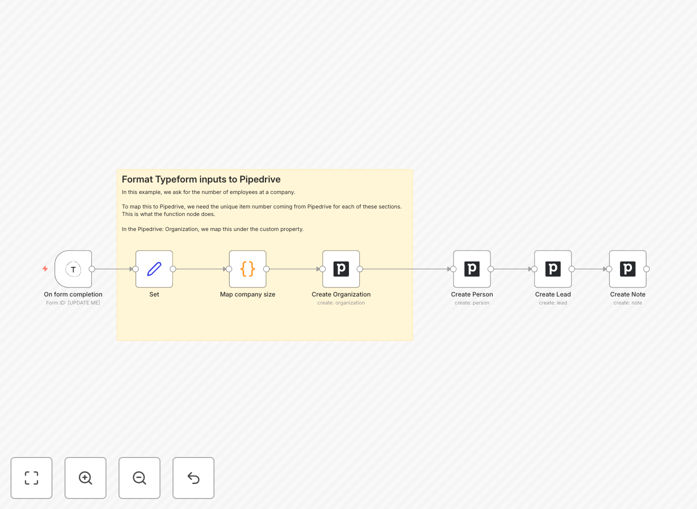
This automation bridges the gap between lead capture and sales follow-up. When someone fills out your Typeform—whether it's a contact form, webinar registration, or product inquiry—their submission is instantly transformed into a fully-fledged lead in your Pipedrive CRM.
The workflow goes beyond simple data transfer. It intelligently maps form responses to relevant Pipedrive fields, including custom fields you've defined for your specific sales process. For example, if you ask about company size in your Typeform, that information populates a corresponding custom field in Pipedrive, giving your sales team immediate context about the lead's potential value.
By eliminating the manual copy-paste process, you ensure zero lead leakage, faster response times, and consistent data formatting across your sales pipeline. The automation also adds notes to the lead record based on specific answers, providing your team with ready-made talking points for personalized follow-up.
How It Works
The workflow follows a logical sequence to transform form submissions into actionable leads.
1. Typeform Trigger
The automation starts when someone submits your Typeform. The workflow listens for new submissions in real-time, capturing all form responses including text answers, multiple choice selections, and file uploads.
2. Data Extraction & Cleaning
A Set node processes the raw form data, extracting only the relevant information needed for your CRM. This step filters out unnecessary metadata and structures the data for clean import into Pipedrive.
3. Custom Field Mapping
A Function node handles complex data transformations. For instance, it can convert text-based company size responses ("1-10 employees") into standardized values that match your Pipedrive custom field options, ensuring consistency across your lead database.
4. Pipedrive Lead Creation
The processed data creates a new lead in your specified Pipedrive pipeline. The workflow populates standard fields (name, email, phone) alongside your custom fields, and adds contextual notes based on key form responses to guide your sales team.
Pro tip: Add a delay node before the Pipedrive step during testing to prevent creating duplicate leads while you fine-tune your field mappings.
Who This Is For
This automation is ideal for sales teams, marketing agencies, consultants, and businesses that use Typeform for lead generation and Pipedrive for CRM management. It's particularly valuable for:
- Sales teams who need instant notification and qualification of new leads
- Marketing agencies running client campaigns with form-based lead capture
- Event organizers managing webinar or workshop registrations
- Consultants & freelancers using contact forms for project inquiries
- Product teams collecting feature requests or beta signups
If you're currently manually transferring form submissions to your CRM or using basic integrations that don't handle custom fields, this workflow will save you hours each week while improving data quality.
What You'll Need
- Typeform account with an active form collecting lead information
- Pipedrive account with appropriate permissions to create leads and custom fields
- n8n instance (cloud or self-hosted) with webhook capabilities
- API credentials for both Typeform and Pipedrive (available in your account settings)
- Custom fields configured in Pipedrive that match your Typeform questions
Quick Setup Guide
Follow these steps to implement this automation in your n8n instance:
- Download the template using the button above and import it into your n8n workspace
- Configure Typeform trigger by connecting your Typeform account and selecting the specific form to monitor
- Map your form fields in the Set node—update the field names to match your Typeform question IDs
- Adjust the Function node to match your custom field logic (like company size categorization)
- Connect Pipedrive with your API credentials and select the target pipeline and custom fields
- Test with a submission using Typeform's preview mode to verify the lead appears correctly in Pipedrive
- Activate the workflow and start automatically capturing leads
Pro tip: Create a test lead in Pipedrive first to see all available custom field IDs, then map your Typeform responses to these exact field names in the workflow.
Key Benefits
Eliminate manual data entry—Save 5-15 minutes per lead that would otherwise be spent copying information between systems. For 50 leads per week, that's 4-12 hours saved monthly.
Improve response time—Leads appear in Pipedrive within seconds instead of hours or days, allowing your sales team to contact prospects while their interest is highest.
Ensure data consistency—Automated mapping eliminates typos and formatting errors that occur with manual entry, leading to cleaner CRM data and more accurate reporting.
Capture complete information—Custom field mapping means you don't lose valuable context from form responses, giving your sales team better qualification information.
Scale without adding staff—Handle hundreds of form submissions daily without increasing administrative workload, allowing your team to focus on selling rather than data entry.