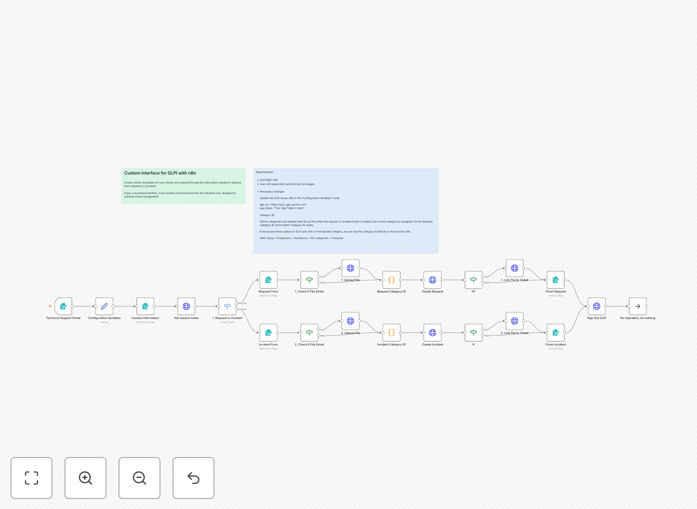
What This Workflow Does
Traditional GLPI interfaces can be intimidating for non-technical users, leading to misclassified tickets, incomplete information, and frustrated support teams. This automation solves that by providing a clean, intuitive web portal where employees can submit support requests without navigating complex GLPI screens.
The workflow creates a unified entry point with adaptive forms that change based on whether the user needs an incident report or a service request. It automatically maps categories, assigns priorities, validates inputs, and creates tickets in GLPI via its REST API—all while providing immediate confirmation and tracking IDs.
Beyond ticket creation, this system reduces administrative overhead for IT staff by eliminating manual data entry, ensuring consistent formatting, and automatically attaching relevant documents. It turns GLPI from a technical backend tool into a user-friendly support channel.
How It Works
Step 1: User Portal Access
Employees access a web form hosted by n8n's form trigger. They select between "Incident" (urgent problem) or "Request" (planned service), which determines the subsequent form fields and validation rules.
Step 2: Adaptive Data Collection
The system presents tailored fields based on ticket type. For incidents, it captures urgency, affected systems, and impact description. For requests, it gathers required resources, timelines, and approval references. All inputs are validated before processing.
Step 3: Automatic GLPI Integration
Using GLPI's REST API with secure authentication, the workflow creates tickets with proper categorization, priority mapping, and user assignment. It handles session management, error recovery, and confirmation delivery back to the user.
Step 4: File Attachment & Tracking
Users can attach relevant documents (screenshots, logs, specifications) which are automatically linked to the created ticket. The system returns a unique ticket ID for future reference and provides optional notification channels.
Who This Is For
This automation is ideal for IT departments, managed service providers, educational institutions, and any organization using GLPI for technical support. It benefits teams struggling with user adoption of GLPI, experiencing high rates of misclassified tickets, or wanting to provide mobile-friendly support access.
Companies with distributed teams, non-technical user bases, or high-volume support requests will see immediate improvements in ticket quality and resolution speed. The portal works equally well for internal IT support and external customer service scenarios.
What You'll Need
- A GLPI server with REST API enabled (version 9.x or later)
- GLPI application token generated with appropriate permissions
- Basic understanding of GLPI's category and priority structure
- n8n instance (cloud or self-hosted) with web form capabilities
- HTTPS endpoint for secure form access (provided by n8n)
Pro tip: Before deploying, map your GLPI categories and priorities to the form options. This ensures tickets route correctly from day one.
Quick Setup Guide
- Download the template JSON file and import into your n8n instance.
- Update the configuration variables with your GLPI server URL and application token.
- Configure HTTP Basic Auth credentials in the GLPI connection nodes.
- Map your ITIL category IDs in the processing nodes to match your GLPI structure.
- Customize form fields, options, and validation rules to match organizational needs.
- Activate the workflow and obtain the web form URL from n8n's form trigger.
- Share the portal link with users and conduct test ticket creations.
Key Benefits
Reduce ticket misclassification by 70%: Adaptive forms and automatic mapping ensure tickets go to the right teams with correct priorities, speeding up resolution.
Cut administrative time by 2–3 hours daily: Eliminate manual data entry, category assignment, and validation checks that IT staff previously performed.
Improve user satisfaction with mobile-friendly access: Provide a clean interface that works on any device, increasing adoption and reducing support channel confusion.
Ensure consistent data quality across all tickets: Automated validation prevents incomplete submissions and standardizes information for better reporting.
Scale support operations without additional training: The intuitive portal reduces GLPI training needs and allows seamless onboarding of new users.