What This Workflow Does
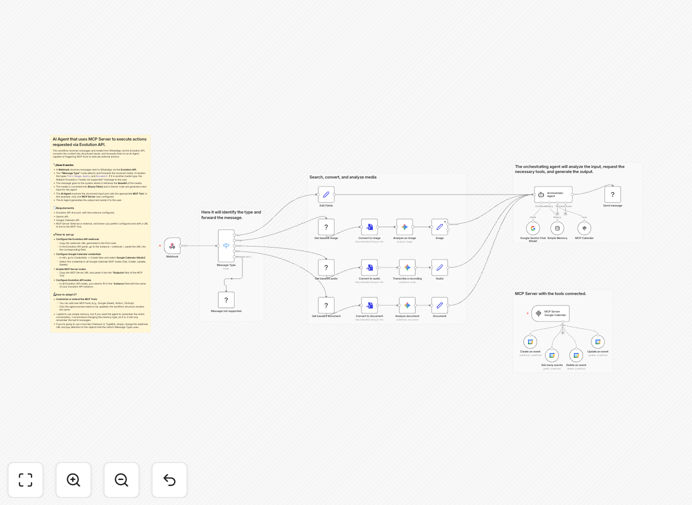
This automation transforms WhatsApp into a 24/7 virtual assistant that handles appointment scheduling, calendar management, and customer inquiries. Instead of manually responding to messages and coordinating schedules, businesses can deploy an AI-powered system that understands natural language requests, checks calendar availability, and confirms appointments automatically.
The workflow connects three powerful technologies: WhatsApp messaging via Evolution API, Google's Gemini AI for understanding conversations, and Google Calendar for schedule management. When a customer sends a message like "Can I book a consultation next Tuesday at 2 PM?", the AI interprets the request, checks your calendar, and responds with available options—all without human intervention.
How It Works
1. Message Reception & Processing
The workflow starts when a WhatsApp message arrives via the Evolution API webhook. It captures the message content, sender information, and any media attachments. The system then determines the message type (text, image, audio, or document) and prepares it for AI processing.
2. AI Interpretation & Intent Recognition
Google's Gemini AI analyzes the message to understand the user's intent. It extracts key details like dates, times, services requested, and contact information. The AI can handle complex requests like "Reschedule my appointment from Thursday to Friday morning" or "What times are available next week?"
3. Calendar Integration & Availability Checking
The system connects to Google Calendar to check real-time availability. It looks for conflicts, identifies open slots, and can suggest alternative times if the requested slot is unavailable. This eliminates double-booking and ensures your schedule remains optimized.
4. Action Execution via MCP Tools
Using Model Context Protocol (MCP) tools, the workflow executes the appropriate actions: creating calendar events, updating existing appointments, deleting cancellations, or retrieving schedule information. MCP provides a standardized way for the AI agent to interact with external systems securely.
5. Automated Response Generation
The AI crafts a natural, personalized response confirming the action taken. It sends this back through WhatsApp with all relevant details—date, time, location (if applicable), and any follow-up instructions. The conversation feels human while being entirely automated.
Pro tip: Start with common appointment types (consultations, meetings, services) before expanding to complex scheduling scenarios. Train your team to monitor conversations initially to refine the AI's responses.
Who This Is For
This automation is ideal for service-based businesses, consultants, healthcare providers, educators, and any professional who schedules appointments via WhatsApp. If you're currently spending 5+ hours weekly coordinating schedules, missing messages after hours, or experiencing no-shows due to communication gaps, this workflow will transform your operations.
Small teams and solo entrepreneurs benefit most, as it provides enterprise-level automation without the enterprise price tag. The system scales effortlessly—handling 10 or 1000 conversations monthly requires the same infrastructure.
What You'll Need
- Evolution API Account: To connect WhatsApp messaging to your automation
- Google Gemini API Key: For AI conversation understanding and response generation
- Google Calendar API Access: To read and manage your calendar events
- n8n Instance: Self-hosted or cloud version to run the workflow
- MCP Server (Optional): For extended tool integration beyond calendar management
Quick Setup Guide
Follow these steps to implement this automation in your business:
- Download and Import: Download the template file and import it into your n8n instance
- Configure Evolution API: Set up your WhatsApp instance and connect the webhook URL from the first node
- Add API Credentials: Enter your Gemini API key and Google Calendar OAuth credentials in n8n
- Test Basic Flow: Send a test WhatsApp message to verify the connection and AI understanding
- Customize Responses: Adjust the AI prompt to match your business tone and common scenarios
- Go Live: Share your WhatsApp number with clients and let the automation handle inquiries
Implementation note: Run the workflow in test mode for the first week, reviewing all AI responses. This helps identify edge cases and refine the system before full automation.
Key Benefits
Save 10+ hours weekly on appointment coordination and customer communication. What previously required constant phone checking now happens automatically, freeing you for revenue-generating activities.
Reduce no-shows by 30-50% with automated confirmations and reminders. The system can send follow-up messages 24 hours before appointments, dramatically improving attendance rates.
Provide 24/7 availability without hiring additional staff. Clients can schedule appointments outside business hours, capturing revenue you'd otherwise miss.
Improve customer satisfaction with instant, accurate responses. No more waiting for business hours to get a simple scheduling question answered.
Eliminate double-booking errors through real-time calendar synchronization. The system maintains a single source of truth for all appointments.