What This Workflow Does
This automation solves a critical problem for businesses and communities: providing instant, intelligent answers in WhatsApp groups without going through Meta's official WhatsApp Business API. The traditional approach requires business verification, approval processes, and ongoing messaging fees—barriers that exclude many small teams and personal projects.
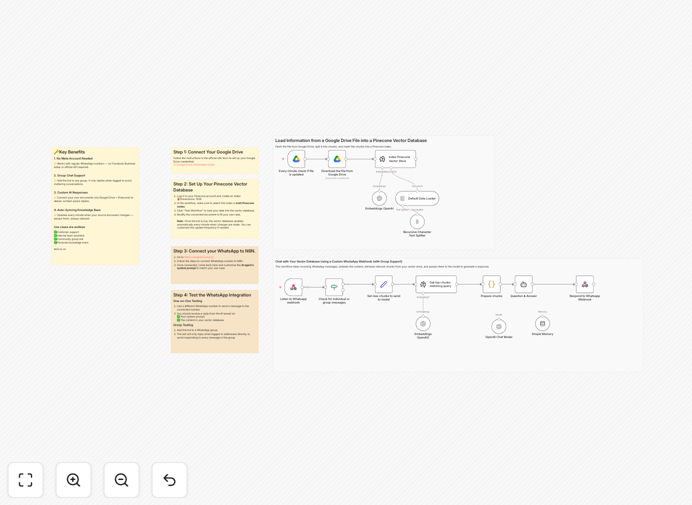
The workflow connects a regular WhatsApp number to a custom webhook, adds an AI bot to any group chat (where it stays silent unless mentioned), indexes documents from Google Drive into Pinecone vector database, and responds with context-aware answers from your custom knowledge base. It automatically updates its knowledge every minute as your documents change, ensuring answers remain current.
How It Works
1. WhatsApp Message Reception
A custom webhook captures incoming WhatsApp messages from both private chats and group conversations. The system distinguishes between group mentions (where the bot must be tagged) and private messages (where it responds to everything).
2. Document Indexing & Vector Search
Your Google Drive documents are automatically processed, split into meaningful chunks, converted into vector embeddings using OpenAI, and stored in Pinecone. When a question arrives, the system performs semantic search to find the most relevant information from your knowledge base.
3. AI Response Generation
The retrieved context is fed to an AI agent with a custom system prompt that controls tone, personality, and response boundaries. The AI generates a natural, helpful answer that's sent back through the webhook to WhatsApp.
4. Continuous Knowledge Updates
A scheduled trigger regularly checks your Google Drive for document changes, ensuring the vector database always contains your latest information without manual intervention.
Who This Is For
This template is ideal for customer support teams needing 24/7 WhatsApp assistance, internal company groups requiring instant access to SOPs and policies, community managers handling frequent member questions, educators managing student groups, and personal power users who want a smart WhatsApp assistant trained on their notes. It's particularly valuable for businesses in regions where WhatsApp is the primary communication channel but Meta's business verification is difficult to obtain.
Pro tip: Start with a single Google Doc containing your most frequent 20-30 Q&A pairs. This gives the AI immediate value while you build out more comprehensive documentation.
What You'll Need
- A Google Drive account with documents to use as your knowledge base
- A Pinecone account with an index created (dimension: 1536)
- Access to the custom WhatsApp webhook (request via the setup form)
- An n8n instance (cloud or self-hosted) to run the workflow
- OpenAI API key for generating embeddings and responses
Quick Setup Guide
1. Connect Google Drive: Set up Google Drive credentials in n8n with access to your knowledge documents.
2. Configure Pinecone: Create an index with dimension 1536 and select it in both Pinecone nodes in the workflow.
3. Get WhatsApp Access: Fill out the access request form to receive WhatsApp linking instructions.
4. Test the Integration: Send a test message from another number, then add the bot to a group and tag it with a question.
5. Customize the AI: Modify the system prompt in the AI agent node to match your brand voice and response style.
Key Benefits
Bypass Meta's Business API restrictions while still getting intelligent WhatsApp automation. This saves weeks of verification processes and eliminates ongoing messaging fees that can cost hundreds monthly.
Reduce support response time from hours to seconds by providing instant AI answers based on your actual documentation. Customers get accurate information immediately, improving satisfaction and reducing agent workload.
Scale to unlimited concurrent conversations without adding staff. The AI handles multiple questions simultaneously, ensuring no customer waits for assistance during peak times.
Maintain complete data control since all processing happens in your n8n instance and Pinecone account. No third-party WhatsApp service providers access your conversations or customer data.
Continuously improve answers by simply updating your Google Docs. The system automatically syncs changes, ensuring the AI always provides the most current information without technical intervention.