
The Problem — One Number, No System
Plenty of service businesses run every customer conversation through a single WhatsApp number, with no shared WhatsApp team inbox behind it. For a while it works fine. One phone, one number on the website, and whoever is nearest picks it up. But the moment the team grows past one person, that single number becomes the bottleneck instead of the convenience it used to be.
The phone gets passed around. Nobody knows who replied to which customer, or whether a message was answered at all. Threads slip through unanswered because everyone assumed someone else had it. And the instant the person holding the phone steps out, goes on leave, or simply logs off for the day, the number goes quiet — customers message into a void. There is no shared view of the queue, no ownership of individual conversations, and no record of who handled what. For a business that runs on WhatsApp, that is a real operational risk, not a minor annoyance.
The Solution — A Shared WhatsApp Team Inbox
GrowwStacks built a shared WhatsApp team inbox on top of that same single WhatsApp number. Every conversation now lands in one dashboard where the whole team can see, at a glance, who messaged, what they said, and who is handling it. There is no phone to pass around and no guessing about ownership — the client, described here only as a service business running its customer conversations over WhatsApp, gets a single shared view of everything coming in.
Agents work that shared view from wherever they are: a browser on a laptop at the desk, or the same app installed on a phone in the field. The result is the visibility, ownership, and continuity a single passed-around phone could never provide, layered on the WhatsApp number customers already know. Much like the custom web app that replaced a no-code workforce stack, this is a purpose-built tool shaped around how the team actually works rather than a generic platform they have to bend to.

How It Works — The Whole Inbox, On a Phone
Nothing about the shared inbox is desktop-only. Everything an agent can do at their laptop, they can do from a phone in exactly the same way — read the queue, filter it, take ownership of a chat, reply, and even start a brand-new conversation. The four screens below walk through that mobile experience, and each capability is then explained in detail in the sections that follow.



Assignment and Replies
Ownership is one click. An agent can assign a chat to themselves the moment they pick it up, or hand it to a colleague by selecting that person's name — so every live conversation has exactly one owner and there is never a question of who is on it. Unassigned conversations get their own filter, which means nothing sits unowned by accident; if a chat has no name against it, it is visible as a gap to be closed, not buried in the queue.
Replying works exactly like WhatsApp itself: type, send, and the message reaches the contact's phone. There is nothing new for an agent to learn. Group chats work seamlessly too, including showing how many people are in each group, so a busy support or sales team handles one-to-one and group conversations from the same familiar interface.
Filtering and Starting Conversations
The inbox filters by Assigned, Unassigned, or any specific team member, and the member filter is multi-select — so a manager can pull up what two or three agents are working on side by side and see the shape of the whole queue at once. It turns a single flat list of messages into something a team lead can actually manage.
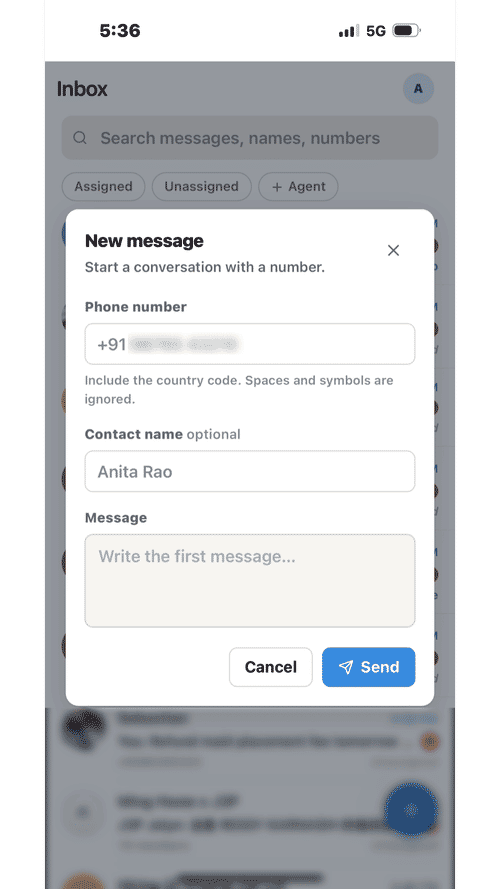
Starting a brand-new conversation is just as direct. It takes a phone number, an optional contact name, and a first message, and the thread opens in the shared inbox like any other — ready to be assigned, replied to, and tracked from the first message onward.
Search, Contacts, and Shared Media
Full-text search runs across every conversation by keyword, and also within a single contact's own history, so scrolling back through months of messages to find one detail is painless rather than hopeless. Whether an agent is hunting for a specific order number across the whole inbox or a promise made to one customer three months ago, the answer is a search away.
Each contact also has a profile panel that gathers everything shared in that chat — all the media, all the documents, and all the links — into one place. Instead of scrolling the thread to find that one PDF or image a customer sent weeks ago, an agent opens the contact panel and it is all there, organised by type.
Works Everywhere — The Installable PWA
The app installs on a phone straight from the browser: open it, add it to the home screen, and it behaves like a native app — the full inbox, the filters, assignment, replies, and starting new conversations, all of it, with no app store download in the way. The very same app runs in any desktop browser, so the team is covered on whatever device each person happens to have in hand.
Personal settings are per-user, not global. Each agent controls their own theme, their own password, and their own notification preferences, and Web Push delivers new-message notifications right to the lock screen — so a field agent knows a customer has replied without keeping the app open. One shared number, but an experience each person can tune to themselves.
Reliability — Nothing Missed
This is the part that makes it safe to depend on. Any gateway-based WhatsApp setup can lose its connection — that is simply the nature of the technology. What matters is what happens next. Here, if the WhatsApp connection drops, an admin reconnects in seconds by scanning a QR code inside the app, and any messages that arrived while it was disconnected sync back automatically. Nothing is lost during the downtime; the gap is filled in as if it never happened.
Admins also manage the team directly from the same place — adding members, removing people who have left, and resetting passwords without waiting on a developer. Keeping the roster current is a self-service task, not a support ticket.
💡 No message left behind — A dropped gateway connection is the moment most WhatsApp tools quietly lose data. Here, reconnection is a QR scan, and everything that arrived during the gap is back-filled on reconnect — so a disconnection is an inconvenience, not a hole in the record.
Under the Hood
The frontend is a React application deployed on Cloudflare Pages, with Cloudflare Pages Functions providing the serverless backend — no separate server to run or maintain. Supabase handles data and file storage, with Postgres for the conversation data and Supabase Storage for the media and documents shared in each chat. Whapi serves as the WhatsApp gateway that connects the shared number to the inbox, and Web Push with VAPID delivers the lock-screen notifications. It is a lean, modern stack that runs the same whether it is one member or a whole team using it, on any device.
The Right Fit — and When It Isn't
This suits any team sharing a single WhatsApp number for customer conversations — support desks, sales teams, agencies, and service businesses — that need ownership, visibility, and continuity across several people and several devices. If more than one person answers the same number, and it matters who owns which conversation and that none go missing, this is built for exactly that. It pairs naturally with an automated WhatsApp support bot as the human-staffed counterpart, and it borrows the same shared-ownership discipline as a multi-agent referral and recruiting pipeline where a lead must never sit unowned in an inbox.
It is less suited to a solo operator who genuinely handles every message themselves — where a shared inbox adds structure without solving a real problem — or to businesses that are required to use the official WhatsApp Business Platform for compliance reasons rather than a gateway-based setup. When the need is real, though, a shared team inbox turns one number into something a whole team can depend on.